Archive for the ‘.NET’ Category
Indexing and Searching with ElasticSearch
Last couple of days I was experimenting with ElasticSearch and different client libraries for .NET. In this post I will detailed the implementation of Indexing and searching using ElasticSearch in .NET. For detailed documentation of Elasticsearch visit official site or Joel Abrahamsson post.
I use PlainElastic.Net as my Elastic search client. PlainElastic is a very simple lightweight library for Elasticsearch. It uses plain json for indexing and query, this gives me more freedom and tooling to create json from the user inputs for indexing and query.
To make it more flexible, our system gets data from the database using views. Datareader class converts this data to Dynamic objects. Then converts it to json and pass it to PlainElastic for indexing. Dynamic object makes life more easier as we can reuse this class with different views without worrying about strong types. Below is the Dynamic class I created.
    public class ElasticEntity:DynamicObject
    {
        private Dictionary<string, object> _members = new Dictionary<string, object>();

        public static ElasticEntity CreateFrom(Dictionary<string, object> members)
        {
            ElasticEntity entity = new ElasticEntity();
            entity.SetMembers(members);
            return entity;
        }

        public string GetValue(string property)
        {
            if (_members.ContainsKey(property))
            {
                object tmp= _members[property];
                if (tmp == null)
                    return string.Empty;
                else
                    return Convert.ToString(tmp);
            }
            return string.Empty;
        }

        public Dictionary<string, object> GetDictionary()
        {
            return _members;
        }

        internal void SetMembers(Dictionary<string, object> members)
        {
            this._members = members;
        }

        public void SetPropertyAndValue(string property, object value)
        {
            if (!_members.ContainsKey(property))
                _members.Add(property, value);
            else
                _members[property] = value;
        }

        public override bool TrySetMember(SetMemberBinder binder, object value)
        {
            if (!_members.ContainsKey(binder.Name))
                _members.Add(binder.Name, value);
            else
                _members[binder.Name] = value;

            return true;
        }

        public override bool TryGetMember(GetMemberBinder binder, out object result)
        {
            if (_members.ContainsKey(binder.Name))
            {
                result = _members[binder.Name];
                return true;
            }
            else
            {
                return base.TryGetMember(binder, out result);
            }
        }

        public override bool TryInvokeMember(InvokeMemberBinder binder, object[] args, out object result)
        {
            if (_members.ContainsKey(binder.Name)
                      && _members[binder.Name] is Delegate)
            {
                result = (_members[binder.Name] as Delegate).DynamicInvoke(args);
                return true;
            }
            else
            {
                return base.TryInvokeMember(binder, args, out result);
            }
        }

        public override IEnumerable<string> GetDynamicMemberNames()
        {
            return _members.Keys;
        }
    }
Indexing
Our views will fetch the data and return as IDataReader. While indexing data, the index helper will iterate through the reader and from the reader the data get loaded to Dynamic ElasticEntity as shown below.
        private ElasticEntity GetRecordAsElasticEntity(IDataReader reader)
        {
            ElasticEntity entity = new ElasticEntity();
            for (int i = 0; i < reader.FieldCount; i++)
            {
                entity.SetPropertyAndValue(reader.GetName(i), reader.GetValue(i));
            }

            return entity;
        }
Before indexing the ElasticEntity, it will be serialized to json using the solution provided in Stackoverflow, it uses JavaScriptSerializer and is very fast. Same approach used while deserializing the json result from Elasticsearch while searching. For deserializing Elasticsearch result, I used json.net initially but deserializing is very slow compare to Javascript serializer.
Below is my Elasticsearch Indexer. It’s a very simple class that uses PlainElastic.Net.
    public class PlainElasticIndexer:Interfaces.IElasticIndexer
    {
        private ElasticConnection _connection;

        private string _indexName;
        private string _type;
        private string _defaultHost;
        private int _port;

        /// <summary>
        /// Default host to localhost and port to 9200. If the host and port is different
        /// then use the parameterized constructor and specify the details.
        /// </summary>
        private PlainElasticIndexer()
        {
            _connection = new ElasticConnection("localhost", 9200);
        }

        public PlainElasticIndexer(string host, int port, string indexName, string type)
        {
            this._defaultHost = host;
            this._port = port;
            _indexName = indexName;
            _type = type;
            _connection = new ElasticConnection(_defaultHost, _port);
        }

        /// <summary>
        /// Default host to localhost and port to 9200. If the host and port is different
        /// then use the parameterized constructor and specify the details.
        /// </summary>
        public PlainElasticIndexer(string indexName, string type):this()
        {
            _indexName = indexName;
            _type = type;
        }


        /// <summary>
        /// Add or update an index. If the ID exist then update the index with the provided json.
        /// </summary>
        /// <param name="json"></param>
        /// <param name="id"></param>
        public void Write(string json, string id)
        {
            string command = Commands.Index(_indexName, _type, id);
            string response = _connection.Put(command, json);
        }
    }
Search
Searching also uses a very simple class as shown below.
    public class PlainElasticSearcher:Interfaces.IElasticSearcher
    {
        ElasticConnection _connection;
        private string _indexName;
        private string _type;
        private string _defaultHost;
        private int _port;

        /// <summary>
        /// Default host to localhost and port to 9200. If the host and port is different
        /// then use the parameterized constructor and specify the details.
        /// </summary>
        private PlainElasticSearcher()
        {
            _connection = new ElasticConnection("localhost", 9200);
        }

        public PlainElasticSearcher(string host, int port, string indexName, string type)
        {
            this._defaultHost = host;
            this._port = port;
            _indexName = indexName;
            _type = type;
            _connection = new ElasticConnection(_defaultHost, _port);
        }

        /// <summary>
        /// Default host to localhost and port to 9200. If the host and port is different
        /// then use the other parameterized constructor and specify the details.
        /// </summary>
        public PlainElasticSearcher(string indexName, string type) : this()
        {
            _indexName = indexName;
            _type = type;
        }

        public string Search(string jsonQuery)
        {
            string command = new SearchCommand(_indexName, _type).WithParameter("search_type", "query_and_fetch")
                                    .WithParameter("size","100");
            string result = _connection.Post(command, jsonQuery);
            return result;
        }
    }
The Search function returns the result as plain json. The caller will convert the json to ElasticEntity using the function shown below.
        public static IList<ElasticEntity> ToElasticEntity(string json)
        {
            IList<ElasticEntity> results = new List<ElasticEntity>();
            JavaScriptSerializer jss = new JavaScriptSerializer();
            jss.RegisterConverters(new JavaScriptConverter[] { new DynamicJsonConverter() });

            JsonTextReader jsonReader = new JsonTextReader(new StringReader(json));

            var jObj = JObject.Parse(json);
            foreach (var child in jObj["hits"]["hits"])
            {
                var tmp = child["_source"].ToString();
                dynamic dynamicDict = jss.Deserialize(tmp, typeof(object)) as dynamic;
                ElasticEntity elasticEntity = ElasticEntity.CreateFrom(dynamicDict);
                results.Add(elasticEntity);
            }

            return results;
        }
I added another class to convert the ElasticEntity to typed object. This helps the caller to convert the ElasticEntity to the Domain objects or to DTO.
    /// <summary>
    /// This class maps ElasticEntity to any DomainSpecific strongly typed class. Say for e.g.
    /// the requesting class wants the search result as a Customer class. This mapper will
    /// create an instance of Customer and get the value from ElasticEntity and set
    /// it to the Properties of Customer. One rule you should follow is
    /// the Columns in the index and Properties in the Domain class should match.
    /// We can say it's a convention based mapping.
    /// </summary>
    public class EntityMapper
    {
        private string _pathToClientEntityAssembly;
        private Assembly _loadedAssembly = null;

        public EntityMapper(string pathToClientEntityAssembly)
        {
            _pathToClientEntityAssembly = pathToClientEntityAssembly;
        }

        internal T Map<T>(ElasticEntity entity) where T:class
        {
            T instance = this.GetInstance<T>();
            Type type = instance.GetType();
            PropertyInfo[] properties = type.GetProperties();

            foreach (PropertyInfo property in properties)
            {
                object value = entity.GetValue(property.Name);
                property.SetValue(instance, Convert.ChangeType(value, property.PropertyType), null);
            }
            return instance;
        }

        private T GetInstance<T>()
        {
            if(string.IsNullOrWhiteSpace(_pathToClientEntityAssembly))
                throw new NullReferenceException(string.Format("Unable to create {0}, path to the
                                        assembley is not specified.", typeof(T).ToString()));

            if(_loadedAssembly==null)
                _loadedAssembly = Assembly.LoadFile(_pathToClientEntityAssembly);

            object instance = _loadedAssembly.CreateInstance(typeof(T).ToString());
            return (T)instance;
        }

    }
The client can call the search function as shown below.
var searcher = new SearchFacade(new PlainElasticSearcher(), assmPath);
IList<Customer> resultAsCustomer = searcher.Search("Customer", jsonQry).Results<Customer>();
where assmPath is the path to Assembly where Customer entity resides. If the user needs the result as ElasticEntity, then set the assmPath as null and make the call as shown below.
IList<ElasticEntity> searchResult = searcher.Search("Customer", jsonQry).Results();
Below code shows the implementation of SearchFacade.
    public class SearcherFacade
    {
        private IElasticSearcher _elasticSearcher;
        private string _pathToEntityAssembly;
        private IList<ElasticEntity> _searchResults;
        /// <summary>
        /// Use this constructor if the client will be dealing with dynamic ElasticEntity.
        /// </summary>
        /// <param name="elasticSearcher"></param>
        public SearcherFacade(IElasticSearcher elasticSearcher)
        {
            _elasticSearcher = elasticSearcher;
        }

        /// <summary>
        /// Use this constructor if the client wants to convert the ElasticEntity to domain specific class.
        /// </summary>
        /// <param name="elasticSearcher"></param>
        /// <param name="pathToEntityAssembly">path to Assembley to locate the Domain specific class</param>
        public SearcherFacade(IElasticSearcher elasticSearcher, string pathToEntityAssembly):this(elasticSearcher)
        {
            _pathToEntityAssembly = pathToEntityAssembly;
        }

        public SearcherFacade Search(string jsonQuery)
        {
            string jsonResult = _elasticSearcher.Search(jsonQuery);
            _searchResults=  DeserializeJson.ToElasticEntity(jsonResult);
            return this;
        }

        public IList<ElasticEntity> Results()
        {
            return _searchResults;
        }

        /// <summary>
        /// Converts dynamic ElasticEntity to strongly typed Domain Entity.
        /// </summary>
        /// <typeparam name="T"></typeparam>
        /// <returns></returns>
        public IList<T> Results<T>() where T:class
        {
            if (string.IsNullOrWhiteSpace(_pathToEntityAssembly))
                throw new NullReferenceException(string.Format("Please provide the Path and Assembly
name in which class {0} resides. Set the fully qualified Assembly path
                          via the constructor that take two parameters.", typeof(T).ToString()));

            EntityMapper mapper = new EntityMapper(_pathToEntityAssembly);
            IList<T> convertedResults = new List<T>();

            foreach (ElasticEntity entity in _searchResults)
            {
                T instance = mapper.Map<T>(entity);
                convertedResults.Add(instance);
            }
            return convertedResults;
        }
    }
This post gives a very simplistic and basic view of our ElasticSearch layer that I created. We have more functionality tailored for our needs. Hope this post helps some one to build a system using ElasticSearch.
Happy Coding…
Lambda expression validation against Entity
The system that I was building, I created a generic Record exist validator. What this does is check whether a specific record exist in the database. Say user can pass a Product code and check whether the Product exist in the database. In some scenario just checking a Product exist may not be sufficient, say while doing an invoice we should validate and raise error if a product is soft deleted but in some scenario we need to check whether the product exist nothing more. That means this custom status check should not implemented to the core Product exist validator. Developer should inject the custom Error condition logic based on the functionality he is working. This post explains the Custom Error conditions logic I implemented based on Lambda expression.
Lambda expression Validation
The easy way for a developer to write a Error condition using Lambda expression, pseudo code will be some thing like this.
(product=>product.isDeleted==true) then raise exception.
Initial 30 minutes I was thinking how to get the body of expression and validate the entity because we cannot directly apply Lambda expression to an entity like Product. When I go deeper into expression evaluation, I realize that I need more time than anticipated and might ended up with a complex functionality. This is what I did to solve this scenario.
-
Add the entity to validate to a generic List
-
Pass the lambda expression to Where() of the list.
-
If the result count is greater than 0 raise the error.
see the code below.
public class ErrorCondition
{
    private object _criteria;
    private Exception _exceptionToRaise = null;

    public ErrorCondition IfTrue<T>(Func<T, bool> criteria) where T:class
    {
        _criteria = criteria;
        return this;
    }

    public void RaiseException(Exception exceptionToRaise)
    {
        this._exceptionToRaise = exceptionToRaise;
        return this;
    }

    internal void Validate<T>(T entity)
    {
        List<T> tmp = new List<T>();
        tmp.Add(entity);
        Func<T, bool> criteria = (Func<T, bool>)this._criteria;
        var result = tmp.Where<T>(criteria).ToList<T>();
        if (result.Count > 0)
        {
            if (_exceptionToRaise == null)
                throw new Exceptions.MaginusException("Error Condition is matching but
no exception attached to ErrorCondition. Please set exception via
                  RaiseException function.");
            throw _exceptionToRaise;
        }

    }
}
User can create a custom error condition as shown below.
ErrorCondition isDeletedCheckCondition = new ErrorCondition();
isDeletedCheckCondition.IfTrue<Product>(p => p.IsDeleted== true)
.RaiseException(new Exception("Product is deleted"));
I created a class to group multiple error conditions user may need to add.
public class ErrorConditions
{
    IList<ErrorCondition> _errorConditions;
    public ErrorConditions()
    {
        _errorConditions = new List<ErrorCondition>();
    }

    public ErrorConditions Add(ErrorCondition condition)
    {
        this._errorConditions.Add(condition);
        return this;
    }

    internal void Validate<T>(T entity)
    {
        foreach (ErrorCondition errCondition in _errorConditions)
            errCondition.Validate<T>(entity);
    }
}
Now user can add multiple Error conditions as shown below.
ErrorConditions errorConditions = new ErrorConditions()
    .Add(new ErrorCondition().IfTrue<Product>(p => p.IsDeleted == true)
       .RaiseException(new Exception("Product is deleted and cannot be added")))
    .Add(new ErrorCondition().IfTrue<Product>(p => p.IsWithdrawn == true)
.RaiseException(new Exception("Product is withdrawn.")));
Pass this errorConditions instance to Product Exist validator, Validator will call errorConditions.Validate<Product>(productToValidate) if the record exist in the database.
The key point to note here is, how we could evaluate an expression with the help of a List. Other wise I have to come up with complex code to analyze the body of the expression and things like that.
Happy coding…
KeyNotFoundException from NHibernate’s Session.Evict
We started getting KeyNotFoundException when we evict an entity from session. The error is not consistent, some time it work and some time it wont. Searched a lot for the cause of this exception but not got any proper solution.
As per the stack trace, the error is because it couldn’t find the key in a collection. In a collection an entities identity is based on the hash code. In this case the entity has composite key. In the GetHashCode function, we append the values of composite properties and get the hash code of the resultant string. When I start checking in more details I saw some properties we used in getting hash code is not exist as part composite key in the mapping file (some keys were removed from the composite mapping but not updated GetHasCode()). I need to do some more analysis to find why those extra fields screwing up the GetHashCode function. I will update the post later if I get the answer.
To avoid these kind of issues make sure to use only composite properties in the Equal and GetHashCode function and avoid using properties that are not part of composite.
Happy coding…
StaleStateException for Entity with Assigned Id and version in NHibernate
I was trying to persist an entity using NHibernate that uses Assigned Id’s and Version concurrency mechanism. Every time I try to persist a new instance, I am getting a StaleStateException. As per my knowledge the concurrency check will happen when we try to do an update, in my scenario it’s throwing while doing an insert. Also in the nhibernate log, I could see nhiberate is firing update command instead of insert.
After doing some googling I come across a stackoverflow post, that NHibernate will fire update or insert based on three parameters.
-
Id
-
Version
-
Timestamp
In my case Id is assigned and it will exist even if it’s a new data and I can’t help it. I am not using Timestamp. So the issue narrowed down to Version. Entity do have a version and unfortunately it’s updated using Automapper, while converting DTO to Entity. I use unix timestamp as version and we added a custom mapping in automapper to fill current date in unix timestamp format if version field is coming as empty from the client and is useful in update scenario. So for NHibernate this is not a new data because it has Id and version, so it will try to do an update instead of insert and that causes all the issues for me.
To solve this issue, either we can use Save() instead of SaveOrUpdate() or set version to zero for new data.
Function returns Entity or DTO
I am working on a project that deals WCF services. In our design we separated Entities and Datacontracts (DTO). The application layer takes care of converting Entities to DTO’s before passing it to Service layer. In the application layer, classes communicates and passes data but I need the inter application layer communication should deals with Entities not DTO’s. So I wanted to find a way so that the function can return Entity or DTO. In this post I will explain how I achieved it, It’s pretty simple.
One option is I could have moved the Entity to DTO mapping to Service layer. I decided not to do it and want to make the service layer light weight.
Another option is shown below.
Let’s take an example of POS system and here we deals with Product. For simplicity I takeout the Interface.
    public class ProductMaintenance
    {
        private Product _currentlyFetchedProduct;

        public ProductMaintenance Get(string productCode)
        {
            //do the logic to fetch product.
            return this;
        }

        public Product ToEntity()
        {
            return _currentlyFetchedProduct;
        }

        public ProductDTO ToDTO()
        {
            //do the logic to map Entity to DTO
            return new ProductDTO();
        }
    }
The Service class will make a call to the ProductMaintenance as shown below
ProductMaintenance productMaintenance = new ProductMaintenance();
return productMaintenance.GetProduct(productCode).ToDTO();
What if the ProductMaintenance class returns more than one type of Data, say it returns Product and List of Product. Then the complexity increases and difficult to handle it.
I introduced a new class to handle this situation called DataGetter, see the code below.
    interface IDataGetter<TSource, TDest>
        where TSource : class
        where TDest : class
    {
        TDest ToDTO();
        TSource ToEntity();
    }
    public class DataGetter<TSource, TDest> : IDataGetter<TSource,TDest>
        where TSource:class
        where TDest:class
    {
        private TSource _entity;
        public DataGetter(TSource entity)
        {
            this._entity = entity;
        }

        public TSource ToEntity()
        {
            return _entity;
        }

        public TDest ToDTO()
        {
            //Do the logic to convert entity to DTO
            return null;
        }
    }
Let’s rewrite the ProductMaintenance class with the new DataGetter.
        public IDataGetter<Product, ProductDTO> GetProduct(string productCode)
        {
            Product productFetched = Repository.GetProduct(productCode);
            return new DataGetter<Product, ProductDTO>(productFetched);
        }

        public IDataGetter<IList<Product>, IList<ProductDTO>> GetAll()
        {
            IList<Product> products = Repository.GetAllProducts();
            return new DataGetter<IList<Product>, IList<ProductDTO>>(products);
        }
The service can call the ProductMaintenance as shown below.
        public ProductDTO GetProduct(string productCode)
        {
            ProductMaintenance productMaintenance = new ProductMaintenance();
            return productMaintenance.GetProduct(productCode).ToDTO();
        }

        public IList<ProductDTO> GetAllProducts()
        {
            ProductMaintenance productMaintenance = new ProductMaintenance();
            return productMaintenance.GetAll().ToDTO();
        }
How to call ProductMaintenance from the same layer, that time we need to deal with Entity instead of DTO. We can easily do that by calling the same function chain with ToEntity() as shown below.
ProductMaintenance productMaintenance = new ProductMaintenance();
return productMaintenance.GetAll().ToEntity();
Another advantage of DataGetter is, we can abstract the Entity to DTO mapping from the application class. So any changes to the mapping provider can be done in a single place. For Entity mapping I use AutoMapper.
Word of Caution
If we are using any ORM with Lazy loading then make sure the repository session is opened till ToDTO or ToEntity call completes. Say for e.g. if we create the session in GetProduct and close the session in the finally, then ToDTO or ToEntity will throw error as the session is closed and unable to do Lazy loading. I use Castle Windsor to inject the repository dependencies and the session will get closed only in the Dispose function.
NHibernate and Oracle Long Varchar field
I am working on a project to create a webservice on top of a Legacy Oracle db. As usual I used NHibernate as the ORM. Every thing is working as expected until I hit a table with a field type of ‘Long’. NHibernate freezes whenever it try to insert records to this table. NHibernate logging was enabled and I could see no action is taking place after issuing the Insert command to this table. So to pin point the issue I commented out the filed with LONG type from the hbm mapping. Then I repeated the test, this time insertion went well without any freezing.
I confirmed that the issue is with this particular Oracle Long datatype field. I guessed that parameter type NHibernate set for this filed is the culprit. I explicitly set the type in hbm file and tried many types supported by NHibernate, but in vain. I wasted so much time trying different types in hbm and googling for a solution, at last I decided to come up with a custom type to solve this issue. I got a starting point from a blog post of nforge.
Let’s see the Custom type I created for Oracle Long.
using System;
using System.Data;
using NHibernate.UserTypes;
using NHibernate;
using Oracle.DataAccess.Client;
namespace Net.Infrastructure.Persistence
{
    public class OracleLongVarcharType:IUserType
    {
        private static readonly NHibernate.SqlTypes.SqlType[] SQL_TYPES =
            { NHibernate.NHibernateUtil.StringClob.SqlType };

        public object Assemble(object cached, object owner)
        {
            return owner;
        }

        public object DeepCopy(object value)
        {
            return value;
        }

        public object Disassemble(object value)
        {
            return value;
        }

        public bool Equals(object x, object y)
        {
            if ( object.ReferenceEquals(x,y) ) return true;
            if (x == null || y == null) return false;
            return x.Equals(y);
        }

        public int GetHashCode(object x)
        {
            if (x == null)
                return 0;

            return x.GetHashCode();
        }

        public bool IsMutable
        {
            get { return false; }
        }

        public object NullSafeGet(System.Data.IDataReader rs, string[] names, object owner)
        {
            object obj = NHibernateUtil.String.NullSafeGet(rs, names[0]);
            if (obj == null) return null;
            string val = Convert.ToString(obj);
            return val;
        }

        public void NullSafeSet(System.Data.IDbCommand cmd, object value, int index)
        {
            if (value == null)
                ((IDataParameter)cmd.Parameters[index]).Value = DBNull.Value;
            else
            {
                OracleCommand oraCmd = cmd as OracleCommand;
                if (oraCmd != null)
                {
                    oraCmd.Parameters[index].OracleDbType = Oracle.DataAccess.Client.OracleDbType.Long;
                    oraCmd.Parameters[index].Value = Convert.ToString(value);
                }
                else
                {
                    ((IDataParameter)cmd.Parameters[index]).Value = Convert.ToString(value);
                }

            }
        }

        public object Replace(object original, object target, object owner)
        {
            return original;
        }

        public Type ReturnedType
        {
            get { return typeof(string); }
        }

        public NHibernate.SqlTypes.SqlType[] SqlTypes
        {
            get { return SQL_TYPES; }
        }
    }
}
I don’t think the implementation need much explanation. Pay attention to NullSafeGet and NullSafeSet. In NullSafeSet I cast the IDBCommand to Oracle command, then reassign the parameter type as OracleDbType.Long. That’s it, we created a new custom type to handle Oracle Long type.
Let’s see how to add this new type to the mapping in hbm file.
<property name="TextData" column="TEXT_DATA" not-null="false" access="property"
type="Net.Infrastructure.Persistence.OracleLongVarcharType,Net.Infrastructure.Persistence"/>
The Insert command NHibernate create before adding the custom type is as shown below
INSERT INTO TEXT_STORAGE (TEXT_DATA, CHANGE_DATE, CHANGE_USER, TEXT_NUMBER) VALUES (:p0, :p1, :p2, :p3);:p0 = ‘Purchase order text’ [Type: String], :p1 = 1352287328 [Type: Int64 (0)], :p2 = ‘sarouje’ [Type: String (0)], :p3 = 100588726 [Type: Int64 (0)]
after adding the Custom type
INSERT INTO TEXT_STORAGE (TEXT_DATA, CHANGE_DATE, CHANGE_USER, TEXT_NUMBER) VALUES (:p0, :p1, :p2, :p3);:p0 = ‘Purchase order text’ [Type: String (0)], :p1 = 1352287328 [Type: Int64 (0)], :p2 = ‘sarouje’ [Type: String (0)], :p3 = 100588726 [Type: Int64 (0)]
Update
Once I did some testing I realize that NHibernate is not fetching data from the table with Long type. After some search I came to know that, while creating the Oracle Command we should set InitialLONGFetchSize to a non zero value. By default OracleCommand set InitialLONGFetchSize to zero. If the InitialLONGFetchSize is zero then data retrieval is deferred until that data is explicitly requested by the application. Even I request explicitly nothing is returning. So only option left is set InitialLONGFetchSize to a non zero. Then the question is how will I get the Command to set this property. I researched for Listeners, Interceptors, etc, nothing helped me. So I decided to inherit from OracleDataClientDriver and create my own as shown below.
using NHibernate.Driver;
using Oracle.DataAccess.Client;
namespace Net.Infrastructure.Persistence
{
    public class OracleDriverExtended:OracleDataClientDriver
    {
        public override void AdjustCommand(System.Data.IDbCommand command)
        {
            OracleCommand cmd = command as OracleCommand;
            if (cmd != null)
                cmd.InitialLONGFetchSize = -1;
        }
    }
}
Now we have to instruct NHibernate to use the new driver I created, update the driver info in hibernate.cfg.xml as shown below.
<property name="connection.driver_class">Net.Infrastructure.Persistence.OracleDriverExtended,
Net.Infrastructure.Persistence</property>
I reran the test and now I could see the data from the Long field. Relieved….
Hope this post will help some one. Happy coding.
Meteor as a persistence layer
The idea of considering Meteor as a persistence layer might be crazy. But there is a good reason for doing that, the real time pushing of data to connected clients using Distribute Data Protocol. Then why cant we write the entire application in Meteor including the User interface, yes we can Meteor supports it. But some people have preference or every one might not be comfortable in creating stunning UI in Meteor but good in ASP.NET. So how do we bridge the best of both the worlds. Let’s take a look at it.
Let’s think about an online Cricket score board, what are all the components we might have
-
A score feeder, a deamon that gets the score from a REST Api or a web service and updates to database.
-
A web app that fetches the data and present it to the user.
The issue here is to get the updated score the user needs to refresh the page. What if user gets the data in real time without doing any page refresh. Let’s see how to add these kind of features.
Here the UI will be in ASP.NET and the DDP client library is DDPClient.NET and for real time signalling of data to connected client, we can use SignalR. DDPClient.NET is integrated with SignalR.

Let’s have a look at how DDPClient.NET can be used in this scenario to push data to connected clients. In one of my previous post I explained a bit detail about DDPClient.NET. Recently I added SignalR framework to it to extend DDPClient accessible from any type of application, be it an ASP.NET or Javascript app or Windows Phone or Desktop app that can act as SignalR Client.
Rest of the post we will see how to receive real time updates from Meteor server using DDPClient.NET.
Right now in DDPClient.NET, SignalR uses self hosting approach. Let’s see how to start the DDPClient.NET, for test I hosted it in a console application.
class Program
{
    static void Main(string[] args)
    {
        DDPClientHost host = new DDPClientHost("http://localhost:8081/", "localhost:3000");
        host.Start();
        Console.ReadLine();
    }
}
DDPClientHost take two parameters the first one is, in which URL DDPClient.NET should listen for incoming request, the second one is to specify where Meteor server is running. Then just call the Start function in the DDPClientHost instance. That’s it, now DDPClient.NET is ready to receive incoming request.
ASP.NET Javascript client
Let’s see how to subscribe to a Meteor’s published item from a javascript client.
$(function () {
    var connection = $.hubConnection('http://localhost:8081/');
    proxy = connection.createProxy('DDPStream')
    connection.start()
             .done(function () {
                 proxy.invoke('subscribe', 'allproducts','product');
                 $('#messages').append('<li>invoked subscribe</li>');
             })
             .fail(function () { alert("Could not Connect!"); });


             proxy.on('flush', function (msg) {
                 $('#messages').append('<li>' + msg.prodName + '</li>');
             });

});
Let’s do a quick walkthrough of the code. As you can see
- The hubÇonnection should point to the url where DDPClient.NET is listening.
- The proxy should be created for DDPStream, it’s a SignalR Hub and is mandatory to use the same name.
-
Once the connection started successfully, we should invoke the Subscribe function declared in DDPStream hub with the published item name declared in Meteor. we should also pass the name of the Collection it returns, in this case it returns a collection of Product. If in case the Meteor’s published item name and the collection name is same then we can simply write proxy.invoke(‘subscribe’, ‘product’); You don’t have to pass the collection name’.
See the code below to see how to publish item from Meteor Server.
Meteor.publish("allproducts", function () {
    return Products.find();
});
Products is a Meteor’s collection that returns Product
Products = new Meteor.Collection("product");
-
Also we should have a function called Flush as shown below. This function will called by the DDPStream to send the data to the connected clients.
proxy.on('flush', function (msg) {
    $('#messages').append('<li>' + msg.prodName + '</li>');
});
Desktop/Console Application client
It’s similar to the code shown above but it will in C#. See the code below.
class Program
{
    static void Main(string[] args)
    {
        var hubConnection = new HubConnection("http://localhost:8081/");
        var ddpStream = hubConnection.CreateProxy("DDPStream");
        ddpStream.On("flush", message => System.Console.WriteLine(message.prodName));
        hubConnection.Start().Wait();
        ddpStream.Invoke("Subscribe", "allproducts","product");
        System.Console.Read();
    }
}
That’s it we are done. Now any insert or update of data to the product collection will get notified instantly to all the connected clients. If you run the application you can see the ASP.NET page will show any newly added product without refreshing the page. The DDPClient.NET is still in development.
You can download DDPClient.NET and the example from Github.
Happy coding…
SignalR – Real time pushing of data to connected clients
Updated post about how to create a chat application using SignalR 2.1
How many times you might have refreshed your browser to see the updated score of a cricket match or refresh to get the updated stock details. Isn’t that cool if the browser can display the updated data without refreshing or doing a page load. Yes it is, then the next question come to mind is how to implement it using .NET technology. There is no straight forward approach, most of them have loads of code.
So how do we achieve it? The answer is SignalR. Scott Hanselman have a nice post about SignalR. In his post he explains a small chat application using 12 lines of code.
I wanted a real time pushing of data to ASP.NET, Javascript client or desktop clients for a project I am working on. The details of that project I will post it later. I am aware of SignalR but never really tried or doesn’t know how to make it work. Yesterday I decided to write a tracer to better understand how SignalR works. This post is all about that tracer I created.
Tracer Functionality
The functionality is very simple. I need two clients a console and a web app. Data entered in any of these clients should reflect in other one. A simple functionality to test SignalR.
Let’s go through the implementation.
I have three projects in my solution 1. SignalR self hosted server 2. A console Client 3. A Web application.
SignalR server
Here I used a self hosting option. That means I can host the server in Console or Windows service. Have a look at the code.
using System;
using System.Threading.Tasks;
using SignalR.Hosting.Self;
using SignalR.Hubs;
namespace Net.SignalR.SelfHost
{
    class Program
    {
        static void Main(string[] args)
        {
            string url = "http://localhost:8081/";

            var server = new Server(url);
            server.MapHubs();

            server.Start();
            Console.WriteLine("SignalR server started at " + url);

            while (true)
            {
                ConsoleKeyInfo ki = Console.ReadKey(true);
                if (ki.Key == ConsoleKey.X)
                {
                    break;
                }
            }
        }

        public class CollectionHub : Hub
        {
            public void Subscribe(string groupName)
            {
                Groups.Add(Context.ConnectionId, groupName);
                Console.WriteLine("Subscribed to: " + collectionName);
            }

            public Task Unsubscribe(string groupName)
            {
                return Clients[groupName].leave(Context.ConnectionId);
            }

            public void Publish(string message, string groupName)
            {
                Clients[groupName].flush("SignalR Processed: " + message);
            }
        }

    }
}
As you can see from the main I hosted the SignalR server in a specific URL. You can see another Class called CollectionHub inherited from Hub. So what is a hub? Hubs provide a higher level RPC framework, client can call the public functions declared in the hub. In the above Hub I declared Subscriber, Unsubscribe and Publish function. The clients can subscribe to messages by providing a Collection Name, it’s like joining to a chat room. Only the members in that group receives all the messages.
You will notice another function called Publish with a message and a groupName. The clients can call the publish method by passing a message and a group name. SignalR will notify all the clients subscribed to that group with the Message passed. So what’s this ‘flush’ function called in publish, it’s nothing but the function defined in the client. We will see that later.
We are done, run the console application and our SignalR server is ready to receive requests.
SignalR clients
First we will look into a Console client. Let’s see the code first.
using SignalR.Client.Hubs;
namespace Net.SignalR.Console.Client
{
    class Program
    {
        static void Main(string[] args)
        {
            var hubConnection = new HubConnection("http://localhost:8081/");
            var serverHub = hubConnection.CreateProxy("CollectionHub");
            serverHub.On("flush", message => System.Console.WriteLine(message));
            hubConnection.Start().Wait();
            serverHub.Invoke("Subscribe", "Product");
            string line = null;
            while ((line = System.Console.ReadLine()) != null)
            {
                // Send a message to the server
                serverHub.Invoke("Publish", line, "Product").Wait();
            }

            System.Console.Read();
        }
    }
}
Let’s go line by line.
-
Create a hub connection with the url where SignalR server is listening.
-
Create a proxy class to call functions in CollectionHub we created in the server.
-
Register an event and callback, so that Server can call client and notify updates. As you can the Event name is ’Flush’, if you remember the server calls this function in Publish function to update the message to clients.
-
Start the Hub and wait to finish the connection.
-
We can call any public method in declared in Hub using the Invoke method by passing the function name and arguments.
Run the console application and type anything and hit enter. You can see some thing like below.
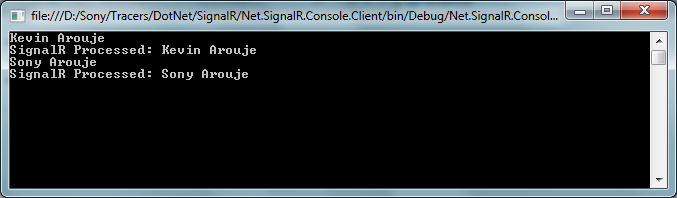
The name prefixed ‘SignalR Processed’ is the message back from the SignalR server. So we are done with a console application.
Now how about we have to display the updates in a web application. Let’s see how to do it in web application. In web application I used javascript to connect to the SignalR server.
<html xmlns="http://www.w3.org/1999/xhtml">
    <script src ="Scripts/json2.js" type="text/jscript"></script>
    <script src="Scripts/jquery-1.6.4.min.js" type="text/javascript"></script>
    <script src="Scripts/jquery.signalR-0.5.3.min.js" type="text/javascript"></script>
    <script type="text/javascript">
           $(function () {
               var connection = $.hubConnection('http://localhost:8081/');
               proxy = connection.createProxy('collectionhub')
               connection.start()
                    .done(function () {
                        proxy.invoke('subscribe', 'Product');
                        $('#messages').append('<li>invoked subscribe</li>');
                    })
                    .fail(function () { alert("Could not Connect!"); });


               proxy.on('flush', function (msg) {
                   $('#messages').append('<li>' + msg + '</li>');
               });

               $("#broadcast").click(function () {
                   proxy.invoke('Publish', $("#dataToSend").val(), 'Product');
               });

           });
    </script>
    <body>
        <div>
            <ul id="messages"></ul>
            <input type="text" id="dataToSend" />
            <input id="broadcast" type="button" value="Send"/>
        </div>
    </body>
</html>
You can install SignalR Javascript client from Nuget and it will install all the required js files. The code looks very similar to the one in Console application. So not explaining in detail.
Now if you run all three application together and any update in one client will reflect in other. As you can see in web client we use Javascript for DOM manipulation, so the page will never refresh but you will see the updated info.

I hope this post might help you to get started with SignalR.
Dowload the source code.
Happy coding….
CQLinq-NDepend’s Code Query Linq
Recently I got the new version of NDepend. Thanks to Patrick Smacchia and team to build such a wonderful tool for the developers.
In one of my previous post I explained the features of NDepend and then after NDepend become the most important tool to make my code healthy and maintainable. One of the NDepend feature really knocked me out is CQL, query the code using SQL like syntax. That was a new experience to me, in my last post I wrote a CQL to find the dead functions in my application as shown below.
SELECT METHODS WHERE
MethodCa == 0 AND !IsPublic AND !IsEntryPoint AND !IsExplicitInterfaceImpl
AND !IsClassConstructor AND !IsFinalizer
Isn’t it cool if we can write these kind of queries in Linq. Yes we can, with the latest version of NDepend V4 we can write Linq queries to query our code and is called CQLinq. Let’s see how we can rewrite the above query using CQLinq.
from  m in JustMyCode.Methods where m.MethodsCalled.Count() ==0 && m.IsPublic==false
&& m.IsEntryPoint==false && m.IsExplicitInterfaceImpl==false &&
m.IsClassConstructor==false && m.IsFinalizer==false select m
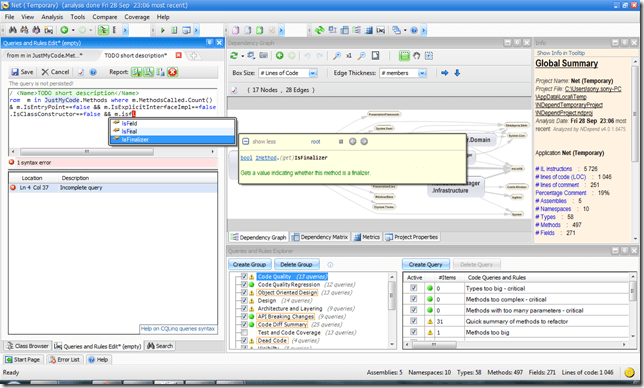
How about the query writer supports intellisense and integratd tool tip documentation? Awesome… I love these guys. Previously I need to remember the keywords like IsEntryPoint/IsExplicitInterfaceImpl etc. Now intellisense will show all the methods and properties. Also tool tip help tells us what is the use of the selected method or property. Cool you don’t have to remember every thing, less work for brain 🙂
See the screen shot below.

If we want to add our own rules and the UI want to show the warning symbol if the query returns value then add warnif as shown below.
// <Name>Dead Methods</Name>
warnif count > 0 from  m in JustMyCode.Methods where m.MethodsCalled.Count() ==0 && m.IsPublic==false
&& m.IsEntryPoint==false && m.IsExplicitInterfaceImpl==false &&
m.IsClassConstructor==false  select m
The Query and Rules explorer window will show the warning as shown below

I just covered very basic of NDepend’s CQLinq. You can find more detailed feature list of NDepend V4 and example CQLinq code from NDepend


 Sony Arouje