Photo Album using Silverlight, Caliburn Micro and Mongo DB
In this post I am going to explain a small Photo Album I created using Silverlight. With this app I also joined the band wagon of NoSQL movement. I used MongoDB as my backend for this application. This application is still in the development mode. I will add more functionality to this application like Public comments, admin module, etc. Currently this app shows the functionality of admin module, like upload photo, delete photo, etc. The application uses MVVM pattern and as usual I used Caliburn Micro here. I used several framework in the app as shown below
- Silverlight
- Caliburn Micro
- Reactive Extension
- MongoDB
- WCF
In this application I used Reactive Extension (Rx) to perform Async service calls. I felt the Rx is a very powerful tool to perform Async calls. The one good advantage of Rx is you can place Async calls in Thread Pool and push it to dispatcher once the call completed. All these can be done in one or two lines of code. This way the UI will always responsive.
This is my first experiment with Mongo db, I can say it’s very easy to use and fast. There are several Mongo drivers for .NET available in the market and is free. I used the one from here. The advantage of Mongodb is, I don’t want to write code to map my POCO to tables. You can directly persist your entity to Mongodb. You can find a lot of article about Mongo db in internet
I don’t think I need to explain Caliburn Micro in detail here. I wrote a post that gives a brief introduction to Caliburn Micro.
Running MongoDB
Below are the steps to run MongoDB
- Download the latest version of Mongo db from Mongodb.org
- Extract the zip file to C:\Mongodb
- Create a Folder called data in C drive
- Create a subfolder called db inside data
- Goto command prompt and change directory to C:\Mongodb
- Type Mongod in the command prompt and hit enter
Now the Mongodb will listen to the default port and our app can make request. There are different ways of hosting Mongodb, you can get more details from Mongodb site.
The App
Below is the screen shot of my application.

This page will display the thumbnails of uploaded images. We can see the bigger image by clicking on the thumbnail as show below.

The preview will display in a Windowless popup. We can delete the photo by clicking the Trash icon bottom right side of the image. We can upload images by clicking on the upload icon at the top right of the window. The upload page will get displayed as shown below.
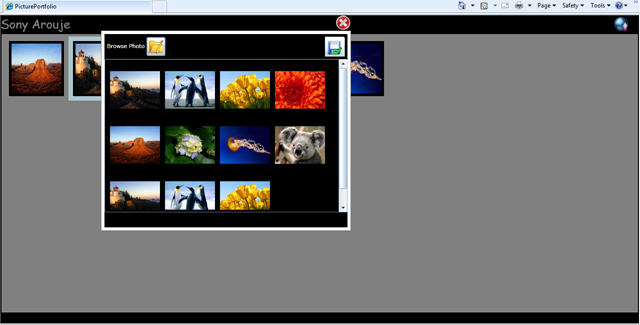
When the user upload the image, the application will create a thumbnail version of the image and store along with the original image in the server. This helps to transfer and load the thumbnail page.
Let’s see the entity used in this application.
using System;
using System.Collections.Generic;
using System.Linq;
using System.Runtime.Serialization;
using System.IO;
using System.Drawing;
using System.Drawing.Imaging;
namespace PicturePortfolio.Domain
{
    [DataContract]
    public class Photo
    {
        private const int THUMBWIDTH = 100;
        private const int THUMBHEIGHT = 100;
        public Photo()
        {

        }
        public Photo(PhotoPersistanceObject persistanceObject)
        {
            this.Name = persistanceObject.Name;
            this.Description = persistanceObject.Description;
            this.ID = persistanceObject.ID;
            this.PublicComments = persistanceObject.PublicComments;
            this.GUID = persistanceObject.GUID;

            this.LoadThumbNail();
        }

        [DataMember]
        public int ID { get; set; }

        [DataMember]
        public string GUID { get; set; }

        [DataMember]
        public byte[] ImageFile { get; set; }

        [DataMember]
        public byte[] ImageThumbNail { get; set; }

        [DataMember]
        public string Description { get; set; }

        [DataMember]
        public string Name { get; set; }

        [DataMember]
        public List<PublicComment> PublicComments { get; set; }

        public PhotoPersistanceObject GetDataForPersistance()
        {
            PhotoPersistanceObject photoPersistance = new PhotoPersistanceObject();
            photoPersistance.ID = this.ID;
            photoPersistance.Name = this.Name;
            photoPersistance.ImagePath = "/test/" + this.Name;
            photoPersistance.Description = this.Description;
            photoPersistance.PublicComments = this.PublicComments;
            if (string.IsNullOrEmpty(this.GUID) == true)
                photoPersistance.GUID = Guid.NewGuid().ToString();
            else
                photoPersistance.GUID = this.GUID;
            return photoPersistance;
        }


        public void SaveImage()
        {
            if (this.ImageFile == null)
                throw new ArgumentNullException();
            try
            {
                byte[] buffer = this.ImageFile.ToArray();
                MemoryStream memStream = new MemoryStream();
                memStream.Write(buffer, 0, buffer.Length);

                this.SaveOrginalImage(memStream);
                this.SaveImageThumbNail(memStream);
            }
            catch (Exception ex)
            {
                throw;
            }
        }

        public void LoadImage()
        {
            string fullFileName = this.GetFileFullPath();
            this.ImageFile = this.GetImageAsByteArray(fullFileName);
        }

        public void LoadThumbNail()
        {
            string fullFileName = this.GetFilePath() + this.ThumbNailImageName;
            this.ImageThumbNail = this.GetImageAsByteArray(fullFileName);
        }

        #region Private Methods
        private void SaveOrginalImage(MemoryStream memStream)
        {
            System.Drawing.Image imgToSave = System.Drawing.Image.FromStream(memStream);
            imgToSave.Save(this.GetFileFullPath(), ImageFormat.Jpeg);
        }
        private void SaveImageThumbNail(MemoryStream memStream)
        {
            Image img = Image.FromStream(memStream);
            Image.GetThumbnailImageAbort myCallback = new Image.GetThumbnailImageAbort(ThumbnailCallback);
            Image imageToSave = img.GetThumbnailImage (THUMBWIDTH, THUMBHEIGHT, myCallback, IntPtr.Zero);
            imageToSave.Save(this.GetFilePath() + ThumbNailImageName, System.Drawing.Imaging.ImageFormat.Jpeg);
        }

        private static bool ThumbnailCallback() { return false; }

        private byte[] GetImageAsByteArray(string fullFileName)
        {
            FileInfo fil = new FileInfo(fullFileName);
            if (fil.Exists == true)
            {
                FileStream fileStream = new FileStream(fullFileName, FileMode.Open, FileAccess.Read);
                byte[] buffer = new byte[fileStream.Length];
                fileStream.Read(buffer, 0, (int)fileStream.Length);
                fileStream.Close();
                return buffer;
            }
            else
                return null;
        }

        private string GetFilePath()
        {
            string filePath = AppDomain.CurrentDomain.BaseDirectory + "Images\\";
            return filePath;
        }
        private string GetFileFullPath()
        {
            string fullPath = this.GetFilePath() + this.Name;
            return fullPath;
        }
        private string ThumbNailImageName
        {
            get
            {
                string fileName = this.Name.Substring(0, Name.LastIndexOf("."));
                return fileName + "_thumb.jpg";
            }
        }
        #endregion
    }
}
The entity class is very simple. I may need to give a brief explanation about PhotoPersistanceObject used in the entity class. The PhotoPersistanceObject is used for persisting meta data of the image like Name, description etc. You might think that why cant we save Photo object directly, yes I also thought the same way but their is some issue with Mongodb driver I used here. It’s not supporting byte array neither binary, It allows to store binary in Mongodb but throws error while retrieving. So I used a trimmed down version of Photo entity to persist the data.
Async Calls using Thread Pool
As I told before one of the cool feature of Reactive Extension is it’s advantage of making async calls in thread pool. Even if we place async calls in separate thread in Silverlight still it will block the UI to load if we do it in page load. Because the our thread will work in UI. We can achieve the placing calls in thread pool using Rx. See the below code.
private void GetAllThumbnails()
{
    var func=Observable.FromEvent<GetAllPhotosCompletedEventArgs>(_service,"GetAllPhotosCompleted")
        .ObserveOn(Scheduler.ThreadPool);
_service.GetAllPhotosAsync();
func.ObserveOn(Scheduler.Dispatcher)
.Select(result => result.EventArgs.Result)
        .Subscribe(s => this.ParseThumbnails(s.ToList()));
}
As you can see the service calls are doing in ThreadPool. Once the call is done we will change the ObserveOn to Dispatcher, other wise cross thread expection will throw. I call the GetAllThumbnails in the constructor of a ViewModel. As we are doing the call in Threadpool my UI will loaded without any delay, once the call is completed the thumbnails will start display in the listbox.
Mongodb Repository
I wrote a Generic repository similar to the one I wrote for EF. You can find the generic repository for EF in one of my post. Below is the Generic repository class for Mongodb.
using System;
using System.Collections.Generic;
using System.Linq;
using System.Text;
using MongoDB;
using MongoDB.Linq;
using MongoDB.Connections;
namespace PicturePortfolio.Persistance
{
    public class GenericRepository:IRepository
    {
        public GenericRepository()
        {

        }

        Mongo _mongoDb=null;
        public IMongoCollection<TEntity> GetQuery<TEntity>() where TEntity : class
        {
            if (_mongoDb == null)
            {
                _mongoDb = new Mongo();
                _mongoDb.Connect();
            }
            return DataBase.GetCollection<TEntity>(typeof(TEntity).Name + "s");
        }

        IMongoDatabase db = null;
        private IMongoDatabase DataBase
        {
            get
            {
                if (db == null)
                {
                    db = _mongoDb.GetDatabase("Protfolio");
                }
                return db;
            }
        }

        public IList<TEntity> GetAll<TEntity>() where TEntity : class
        {
            try
            {
                return GetQuery<TEntity>().Linq().ToList<TEntity>();
            }
            catch (Exception ex)
            {
                throw;
            }
        }

        public IList<TEntity> Find<TEntity>(System.Linq.Expressions.Expression<Func<TEntity, bool>> criteria) where TEntity : class
        {
            return this.GetQuery<TEntity>().Linq<TEntity>().Where(criteria).ToList<TEntity>();
        }

        public TEntity Single<TEntity>(System.Linq.Expressions.Expression<Func<TEntity, bool>> criteria) where TEntity : class
        {
            return this.GetQuery<TEntity>().Linq<TEntity>().Single(criteria);
        }

        public TEntity First<TEntity>(System.Linq.Expressions.Expression<Func<TEntity, bool>> criteria) where TEntity : class
        {
            return this.GetQuery<TEntity>().Linq<TEntity>().First(criteria);
        }

        public void Add<TEntity>(TEntity entity) where TEntity : class
        {
            this.GetQuery<TEntity>().Save(entity);
        }

        public void Delete<TEntity>(TEntity entity) where TEntity : class
        {
            this.GetQuery<TEntity>().Remove(entity);

        }

        public void Delete<TEntity>(IEnumerable<TEntity> entites) where TEntity : class
        {
            throw new NotImplementedException();
        }

        public void Update<TEntity>(TEntity entity, TEntity old) where TEntity : class
        {
            this.GetQuery<TEntity>().Update(entity, old, UpdateFlags.None, true);
        }
    }
}
This app is in very primitive stage. you may need to do lot of refactoring to make use in real scenario. I will work on this app and upload it to codeplex some times later.
Download the current source here.
An Introduction to Caliburn Micro
Introduction
This post gives some brief introduction to develop Silverlight applications using Caliburn Micro which gives the basic features are:
- BootStrapping
- Conventions to write ViewModels
- Event Aggregation
- Action Message
Once you got the above basic ideas, it’s very easy to develop scalable applications in Silverlight. You can download the latest Caliburn Micro source from CodePlex.
When MVVM pattern introduced into my Silverlight development, initially it’s not digesting for me. But after I got the clear picture of MVVM pattern, I felt It’s very easy to develop Silverlight application that can adaptable to changes very easily. We choose Caliburn Micro as our MVVM framework, one reason it’s very light weight, another reason is the code base is very less. As the code base is very less we can go through it understand it better.
I hope every one who reads this post has some idea of MVVM pattern. In short MVVM separates View (presentation) and the code manipulates the view separately, and called it as View Model. One of the main advantage of MVVM is we can modify View or ViewModel without affecting each other. There is no event handlers for any control in the code behind, so it’s easy to replace one control with another. We can even reuse the same view model for different platform, let say we are developing an app for both Silverlight and WP7, here only difference in view is it’s base classes but UI is same. So we can share the same View Model thus by increase the maintainability and decrease the effort.
How the View and View Model’s will communicate? here the MVVM framework like Caliburn Micro will comes into picture. The MVVM Framework will bind the View and View Model’s. There are several MVVM frameworks in the market like Prism, MVVM Light, etc. but am not going to cover those.
Caliburn Micro uses conventions to bind View and View Model’s, I feel the conventions are better than wiring through code or attributes. You will get the conventions of Caliburn Micro as we progress through this post.
There are two approach in MVVM model, Code first and View first. Which one is better? I am not the person to comment on, their is an age old debate is going on. Personally I prefer Code First approach. But here to simplify things I will do it in View First approach.
Caliburn Micro In Action
Let’s do some small application in Silverlight using Caliburn Micro. The functionality of this app is pretty simple, display a list of customer and allow the user to edit it.
I am going to create a user control to display the details of individual customer. In the listing page we will bind this User control to a List. Let’s create the control.
IndividualResultView.xaml
    <Grid x:Name="LayoutRoot" Background="White">
        <Border BorderThickness="3" BorderBrush="Black" Margin="3">
            <Grid Margin="5">
                <Grid.RowDefinitions>
                    <RowDefinition Height="30"></RowDefinition>
                    <RowDefinition Height="60"></RowDefinition>
                    <RowDefinition Height="30"></RowDefinition>
                    <RowDefinition></RowDefinition>
                </Grid.RowDefinitions>
                <Grid.ColumnDefinitions>
                    <ColumnDefinition Width="120"></ColumnDefinition>
                    <ColumnDefinition></ColumnDefinition>
                </Grid.ColumnDefinitions>

                <TextBlock x:Name="lblName" Text="Name" Grid.Row="0" Grid.Column="0"></TextBlock>
                <TextBlock x:Name="Name" Grid.Row="0" Grid.Column="1"></TextBlock>

                <TextBlock x:Name="lblAddress" Text="Address" Grid.Row="1" Grid.Column="0" ></TextBlock>
                <TextBlock x:Name="Address" Grid.Row="1" Grid.Column="1"></TextBlock>

                <TextBlock x:Name="lblPhoneNumber" Text="Phone#" Grid.Row="2" Grid.Column="0"></TextBlock>
                <TextBlock x:Name="PhoneNumber" Grid.Row="2" Grid.Column="1"></TextBlock>

                <HyperlinkButton x:Name="EditCustomer" Grid.Row="3" Content="Edit"></HyperlinkButton>
            </Grid>
        </Border>
    </Grid>
IndividualResultView.xaml.cs
Let’s see the IndividualResultView.xaml.cs, as per the MVVM pattern it should not contain any View related code, other than initializing the UI controls. You can see that our code behind is clean.
using System.Windows.Controls;

namespace WCFEnabledSilverlightApp.Views
{
    public partial class IndividualResultView : UserControl
    {
        public IndividualResultView()
        {
            InitializeComponent();
        }
    }
}
We need to create a ViewModel for the above view, let’s do it. I named my ViewModel as IndividualResultViewModel.cs. Below is the code
using DataModel;
using Caliburn.Micro;
namespace WCFEnabledSilverlightApp.ViewModels
{
    public class IndividualResultViewModel:PropertyChangedBase
    {
        string _name;
        public string Name
        {
            get { return _name; }
            private set
            {
                _name = value;
                NotifyOfPropertyChange(() => Name);
            }
        }

        string _address;
        public string Address
        {
            get { return _address; }
            private set
            {
                _address = value;
                NotifyOfPropertyChange(() => Address);
            }
        }

        public string PhoneNumber { get; private set; }

        private Customer _customer = null;
        public IndividualResultViewModel(Customer customer)
        {
            this._customer = customer;

            this.Name = customer.CustomerName;
            this.Address = customer.Address;
            this.PhoneNumber = customer.PhoneNumber;
        }

        public void EditCustomer()
        {
            EditCustomerViewModel editCustomer = new EditCustomerViewModel(_customer);
            Screen scrn = new Screen();
            WindowManager winMngr = new WindowManager();
            winMngr.ShowDialog(editCustomer);
        }
    }
}
Convention 1
We learned our first convention of Caliburn Micro. The UI should suffix with “View”. The View Model should suffix with “ViewModel” and prefix with ViewName
<ViewName>View.xaml
<ViewName>ViewModel.cs
Eg.
IndividualResultView.xaml
IndividualResultViewModel.cs
Convention 2
You might have noticed that in the view and viewmodel we used some convention. The name of TextBlock that display the customer details have a corresponding property in ViewModel. For E.g. the TextBlock name for displaying Customer Name is “Name” and in ViewModel you can see a property “Name”. The Caliburn Micro will bind the Property in the ViewModel to the View. That means what ever value we set for property “Name” will be displayed in the View. Pretty simple.
You might have one question now how to handle click event or those kind of events raised by your view in our View model. It’s pretty easy create a function with same name as your button. Just go back to the View and check the name of the hyperlink button, also check whether their is method with same name in View model. Hyperlink button name is EditCustomer and I have one method in View model EditCustomer. The method will create an instance of another view model.
Later in this post you can see how we can pass parameters from your view to view model.
NotifyOfPropertyChange
In our properties the setter calls a function called NotifyOfPropertyChange, what is the use of this function call? We call this function to notify the UI that the value has changed in the view model. We can notify UI without calling NotifyOfPropertyChange by implementing INotifyPropertyChanged interface and pass the property name. Caliburn Micro wraps the implementation of INotifyPropertyChanged in PropertyChangedBase and our view model is inherited from it. NotifyOfPropertyChange we are not passing any string value instead we pass the Property itself. The advantage of this method is we can use VS refactoring feature on properties. If we pass it as string then refactoring will not take into consideration.
Event Handling
When I implemented MVVM using Caliburn Micro I implemented the communication between View Models using normal event driven mechanism. That means If I want to handle an event occurred in a child view model in the parent. Then child view model raise an event and the parent will handle it. I didn’t like this approach as it creates a dependency between View models. So I start exploring Caliburn Micro to figure out the event handling features and my search ends in EventAggregator.
Caliburn Micro’s Event Aggregator functionality is a very powerful implementation of Observer pattern. We can write View Models with less coupling using EventAggregators. Let’s see how can we establish communication between View Models using Event Aggregator.
In the sample code I created a static property to give access to EventAggregator as shown below
public class EventAggregationProvider
{
    static EventAggregator _eventAggregator = null;
    public static EventAggregator EventAggregator
    {
        get
        {
            if (_eventAggregator == null)
                _eventAggregator = new EventAggregator();

            return _eventAggregator;
        }
    }
}
In the sample app I have a popup window to edit the Customer Details, when the user clicks Save/Ok I need to notify the Parent View Model to initiate the Save process. Let’s see how to implement it.
In my CustomerEditViewModel.cs there is a method called SaveCustomer which will get called when the user clicks Ok from the View. You can see that in SaveCustomer I am publishing the Customer object. See how I am publishing it.
EventAggregationProvider.EventAggregator.Publish<Customer>(customer);
This ViewModel done his job, it’s job of the parent view model who can subscribe to this message and get the notification. Now let’s see how the parent view model is subscribing to this event.
public class CustomerListingViewModel : PropertyChangedBase, IHandle<Customer>
{
    public CustomerListingViewModel()
    {
Messages.EventAggregationProvider.EventAggregator.Subscribe(this);
}
    public void Handle(Customer message)
    {
       //do the save process
    }
}
To Subscribe to Customer message the CustomerListingViewModel is implemented by IHandle<Customer>. That means this CustomerListingViewModel is capable of handling any message with type Customer. One more line of code need to added to get notification. You can see in the constructor of CustomerListingViewModel to subscribe to EventAggregator.
Your View Model can subscribe to any number of messages by implementing IHandle with the respective type. For e.g
public class CustomerListingViewModel : PropertyChangedBase, IHandle<Customer>,IHandle<Order>
{
    public CustomerListingViewModel()
    {
Messages.EventAggregationProvider.EventAggregator.Subscribe(this);
}
    public void Handle(Customer message)
    {
       //do the save process
    }
public void Handle(Order message)
{
//do the save process
}
}
In the above e.g this View Model will get notified if any view model publish Customer or Order message.
Action Message
The Action Message is one of the functionality of Caliburn Micro to call parameterized function from View. Let’s see how we can do it. To do this we need to refer system.windows.interactivity assembly.
In the below e.g. a message box will show when a LostFocus happened in View EditCustomerView. Let’s go through the View
           xmlns:i="clr-namespace:System.Windows.Interactivity;assembly=System.Windows.Interactivity"
           xmlns:ca="clr-namespace:Caliburn.Micro;assembly=Caliburn.Micro"
                <TextBox x:Name="Name"  Grid.Row="0" Grid.Column="1">
                    <i:Interaction.Triggers>
                        <i:EventTrigger EventName="LostFocus">
                            <ca:ActionMessage MethodName="NameLostFocus">
                                <ca:Parameter Value="{Binding ElementName=Name,Path=Text}"></ca:Parameter>
                            </ca:ActionMessage>
                        </i:EventTrigger>
                    </i:Interaction.Triggers>
                </TextBox>
I referenced System.Windows.Interactivity and Caliburn Micro in the View. As you can see in the above view I mentioned “LostFocus” to the EventName. The ActionMessage takes the MethodName that we created in the ViewModel. Parameter’s Value take the parameter to the method. So what’s this means, it’s very simple, whenever the lost focus happened in Name text box then the view should call NameLostFocus method with TextBox’s Text as the parameter. Below is the NameLostFocus method in the ViewModel
public void NameLostFocus(string text)
{
    MessageBox.Show(text);
}
You can see more about Action Message in Rob’s blog
Bootstrapping
Bootstrapping is the method of booting our application and allow Caliburn Micro to take the control. So how to create a bootsrapper. It’s very simple as shown below
namespace WCFEnabledSilverlightApp
{
    public class BootStrapper:Bootstrapper<ViewModels.CustomerListingViewModel>
    {

    }
}
It’s tells caliburn that CustomerListingViewModel is the first page to load. It’s same as setting RootVisual to the some page say MainPage in non MVVM model. We need to provide this BootStrapper in App.xaml as shown below
<Application xmlns="http://schemas.microsoft.com/winfx/2006/xaml/presentation"
             xmlns:x="http://schemas.microsoft.com/winfx/2006/xaml"
             x:Class="WCFEnabledSilverlightApp.App"
             xmlns:bs="clr-namespace:WCFEnabledSilverlightApp"
             >
    <Application.Resources>
        <bs:BootStrapper x:Name="bootStrapper"></bs:BootStrapper>
    </Application.Resources>
</Application>
Below is code behind of App.xaml. No code just clean.
using System.Windows;

namespace WCFEnabledSilverlightApp
{
    public partial class App : Application
    {
        public App()
        {
            InitializeComponent();
        }
    }
}
This post is just an introduction to Calibun Micro, just use it and get more comfortable with it. Thanks for reading this long post.
Introduction to Caliburn Micro Part 2
Download the source code.
Making Async calls in Silverlight using Reactive Extension (Rx)
In this blog I am going to explain briefly about how to make async calls using Reactive Extension (Rx). Every one knows that Silverlight is one of the best platform to create RIA’s. One of the architecture constrain of Silverlight is, it wont directly interact with backend DB. So we need to have a webservice to perform the db operations. Silverlight can consume WCF or asmx service, but their is a catch silverlight can only communicate to webservices asynchronously. We all know that async calls have several advantages. One key feature of async call is, it wont block the UI while performing the call. But one downside in async programming is the coding pattern involved in placing async calls. When I place an async calls, I use an anonymous delegate approach or use lambda expression. But some how I am not satisfied with any of these approaches, I feel my code is not clean. So we always look for a better approach and our long waiting is over with the introduction of Reactive Extension (Rx) from MS labs.
You can visit Rx web site to get more details. I am not a person to explain the architecture or indepth details of Rx instead I am going to show how it benefit me in my async programing. I am going to rewrite one of my application I wrote to upload images using Silverlight and WCF, you can get more details of that app from my blog. I will rewrite only the part where I make async calls to server to get images from WCF service. Before get into refactoring, We need to download and install the Rx libraries from Rx web site.
Let’s refactor the code to make our async calls using Rx. We need to add couple of assembly references to add Rx to Silverlight, below are those assemblies.
- System.Observables
- System.CoreEx
- System.Reactive
I demonstrated two ways of interacting with WCF service in the source code I uploaded. A proxy and proxy less approach. We all know the proxy approach, the communication to the service using the class generated by VS. In one of my post I provided some insight of Proxy less approach, you can check it out here.
If you have my source code in hand, have a look at the ImageListViewModel.cs in Silverlight app. You can see how I am making the async call.
In proxy less approach I use lambda expression to make the call.
IImageServiceAsync imgService = ServiceChannelProvider.CreateChannel<IImageServiceAsync>();
imgService.BeginGetAllImage(save =>
{
    try
    {
        imgs = imgService.EndGetAllImage(save);
        this.AddToUserLogoList(imgs);
    }
    catch (Exception ex)
    {
        throw;
    }
}, imgService);
In proxy approach I used a event driven approach as shown below.
ImageServiceClient imgClient = new ImageServiceClient();

imgClient.GetAllImageCompleted += new EventHandler<GetAllImageCompletedEventArgs>(imgClient_GetAllImageCompleted);
imgClient.GetAllImageAsync();
void imgClient_GetAllImageCompleted(object sender, GetAllImageCompletedEventArgs e)
{
    for (int i = 0; i < e.Result.Length; i++)
    {
        this.UserLogos.Add(e.Result[i]);
    }
    NotifyOfPropertyChange(() => UserLogos);
}
I am not going to explain the downside of these approaches mentioned above, Just like me you all might have experienced it. Lets rewrite the code using Reactive Extension (Rx).
Proxy less approach
private void ReadAllImages()
{
    IImageServiceAsync imgService = ServiceChannelProvider.CreateChannel<IImageServiceAsync>();
    var func = Observable.FromAsyncPattern<IList<UserImage>>(imgService.BeginGetAllImage, imgService.EndGetAllImage)
        .Invoke()
        .SubscribeOnDispatcher()
        .Subscribe(s => this.UserLogos = s.ToList<UserImage>());
}
Rx have one method called FromAsyncPattern, there we can provide our Beginxxx and Endxxx functions. I provided BeginGetAllImages and EndGetAllImages to FromAsyncPattern function. I also provided the return type of EndGetAllImages() to FromAsyncPattern function. Return type of EndGetAllImages is IList<UserImage>, so I called FromAsyncPattern as FromAsyncPattern<IList<UserImage>>. Rx uses Observer pattern to publish the result. So here I added UserLogos properties as my observer, once the execution is done the result will be pushed to the observer. Here the observer is a property in my view model. Below is the UserLogos property
List<UserImage> _logos = new List<UserImage>();
public List<UserImage> UserLogos
{
    get { return _logos; }
    private set
    {
        lock (this)
        {
            _logos = value;
            NotifyOfPropertyChange(() => UserLogos);
        }
    }
}
Let’s see how we can make an async call in proxy generated approach.
private void ReadAllImages()
{
    ImageServiceClient imgClient = new ImageServiceClient();
    var o = Observable.FromEvent<GetAllImageCompletedEventArgs>(imgClient, "GetAllImageCompleted")
        .ObserveOn(Scheduler.ThreadPool)
        .Select(result => result.EventArgs.Result)
        .Subscribe(s => this.UserLogos = s.ToList<UserImage>());
    imgClient.GetAllImageAsync();
}
Here I used FromEvent function provided by Rx instead of FromAsyncPattern. FromEvent accepts the event type, here it is GetAllImageCompletedEventArgs. It also accepts the service client object and which event it should handle. I passed the GetAllImageCompleted to the FromEvent function. Then we need to attach UserLogos as observer. After that we called GetAllImageAsync of service proxy.
You can see our code is pretty clean, we don’t have any messy code that we normally write to handle the async calls. Once you start using Rx I think you will never go back to the old approach of placing async calls.
NDepend a .NET Code Scanner
This post is a very brief overview of NDepend, a static code analysis tool. In this post am just touching some key feature of NDepend. I didn’t have much idea about NDepend until Patrick Smacchia introduced it to me recently. After I got the pro license I did a quick glance of NDepend, I felt like it’s a code scanner for developers just like body scanner for doctors :).
Installation of NDepend is very simple, download the zip from NDepend site with the secret code. Just unzip and drop the license xml file, that’s it. Tools provides a VS addin as well. If you want to add NDepend to VS IDE then install NDepend.Install.VisualStudioAddin.exe. Open the Visual Studio and you can see the NDepend Menu.
I thought of writing this blog after going through the features of NDepend. First I thought I will analyze any of my existing code but I didn’t feel comfortable in analyzing old codes. One reason is, I might have forgotten how the function calls and the dependency structure. So I decided to write a new application and run NDepend on it, so that I can benchmark it better. I wrote a Twitter Public timeline reader for WP7 to test NDepend. You all can see the details of that project in my previous post.
Now it’s time to go through the code analysis using NDepend. The time to gather the data for code analysis is pretty fast, NDepend didn’t make me wait for long. The first thing I wanted to see is the Dependency Graph, below is the graph it generated
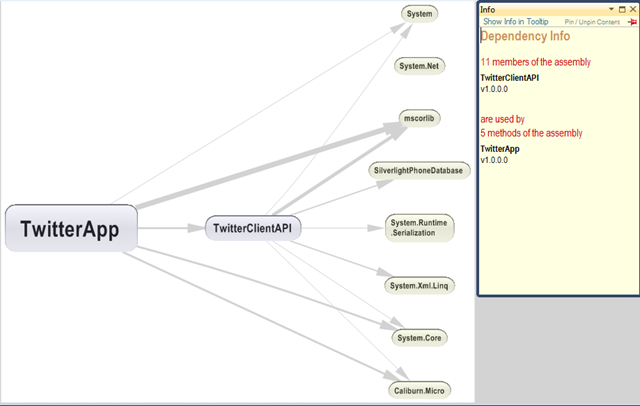
You might be noticed that some arrow is in different size, this is what the context sensitive help of NDepend says
On this graph, the thicknesses of edges are proportional to the strength of coupling in terms of number of members involved
How cool it is, by just looking at this graph I can visualize how much is the coupling between the assemblies. Clicking on the arrow will give you an info window on the right side and will provide the details of the coupling.
One of the excellent part of this tool is, it have a very good help, you will never get stuck any where. For e.g. below is the class browser of NDepend
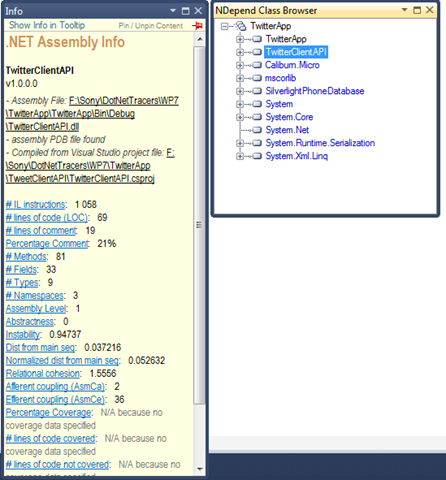
By clicking on the assembly in the NDepend class browser will display the details about the assembly. You may not get each and every details, don’t worry all those labels are hyperlinked to NDepend site and they provided decent help document.
CQL
One of the well know feature of NDepend is Code Query Language (CQL). It’s a new experience for me to write a SQL kind of query against assembly. For E.g. I can write a query like below to find out the unused methods in my project
SELECT TOP 20 METHODS WHERE
MethodCa == 0 AND
!IsPublic AND !IsEntryPoint AND
!IsExplicitInterfaceImpl
AND !IsClassConstructor AND
!IsFinalizer
When you run NDepend against your assemblies it will generate a standard list of queries to analyze your code. If you feel like it’s not sufficient then the tool provided the flexibility to you to write your own CQL query. It provides a very good query editor with intelisence. You can go to NDepend site to get more help on CQL.
I was so amazed about this query functionality of NDepend, I just wanted to know how the NDepend query the assembly. My search leads to Patrick’s reference about Cecil, one of the open source project to inspect libraries in ECMA CIL format. With the help of Cecil they implemented the CQL, a wonderful piece of functionality in NDepend.
Dependency Matrix
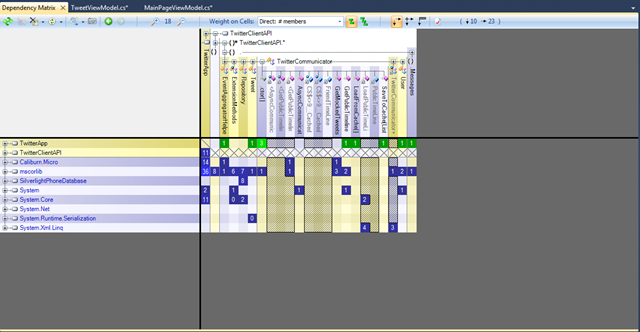
Its a very handy feature of NDepend, it will give you matrix structure of the Assembly dependency as shown below

In this matrix I can see dependency in a matrix format. I clicked on the intersection point of TwitterApp and TwitterClientAPI (TwitterApp is on left and TwitterClientAPI is on the top). As you can see the tool give me a plain english description that 5 Methods of TwitterApp is using 11 members of TwitterClientAPI. I was curious and wanted to see which are all the methods of my TwitterClientAPI.TwitterCommunicator class is used by TwitterApp.
I only wanted to do is just expand the TwitterClientAPI on the top and again expand the TwitterCommunicatorAPI as shown below. The matrix shows that TwitterApp is calling GetPublicTimeLine function ones, yes its true. Same like it will display for other functions as well.
As I told earlier in the post, the tool also provides a pictorial Dependency Graph representation. You can get the same dependency graph from the Matrix as well. Right click on the intersection (Colored columns) and say Build a Graph, pretty simple. Below is the screen shot of the Dependency graph of TwitterApp with TwitterCommunicator class
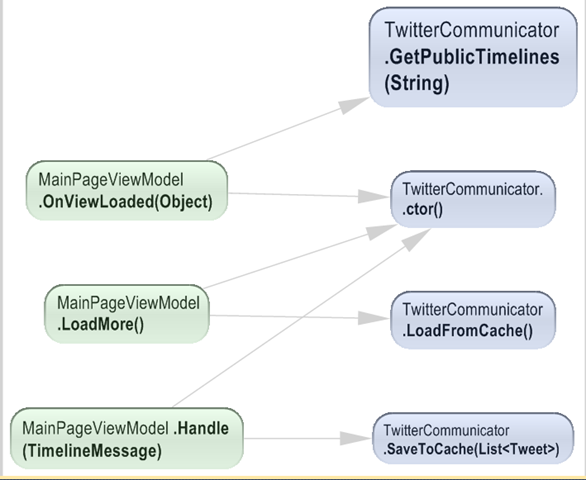
Dependency Matrix provides a more in depth graph. From the screen shot you can see the depth of the description it provides. I don’t think I need to give any more explanation of the above graph. NDepend made your code analysis smooth and simple.
Summary
As I told earlier I just scratched the tip of an iceberg. In this post I left behind so many other features of NDepend, I will add more post about NDepend later. As Scott Hanselman said in his blog Exiting the Zone of Pain, yes NDepend is really a pain reliever. Investing some money to acquire this tool is worth. NDepend have a free trial version for open source projects and Academic purpose. Visit NDepend site for more details.
Twitter Public Timeline reader for WP7 using Caliburn Micro
This is my first app for Windows Phone 7. This application doesn’t have much functionality, it just make a call to Public Timeline rest api to get the tweets. I choose PublicTimeline as it doesn’t requires any Twitter authentication. John Papa have a blog about communicating with Twitter, I used his blog to gather the details to communicate with Twitter. As usual I used my favorite MVVM frame work Caliburn Micro here as well. To kick start with WP7 development using caliburn micro I suggest to download the template from shazaml.com. The template has the CM’s WP7 bootstrapping technique mentioned by Rob Eisenberg in his blog.
Screen shot of my app.
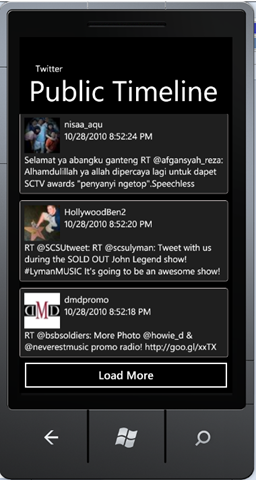
In this app I used Microsoft Reactive Extension (Rx) libraries to make asynchronous call to Twitter. I combined both the Rx and Caliburn micro’s EventAggregator to do Async call and publish the data. Rx works in publisher/subscriber model, Initially I wrote an observer by my self. After I thought why should I reinvent the wheel, as Caliburn Micro has a powerful publisher/subscriber module. So I removed my observer class with EventAggregator shipped with CM. I used Rx here to avoid all the messy code that we need to write to make an async call. Jerome Laban have a blog about Rx library and is a pretty good article to start off with Rx library.
Another functionality I wanted to add to the app was caching facility, that means the app should be able to cache older tweets. Instead of fetching from Twitter we can get it from cache, if user wants to see older tweets. I was thinking of serializing my Entities to IsolatedStorage and do all the hard work by myself. Before implementing the serialization functionality I did a google search and come accross this codeplex project called winPhone7db. It did a decent job of serializing my entities to Isolated storage. As the name states its gives a feel like we are dealing with db. It encapsulates all the hurdles of communicating with Isolated storage and serialization.
Let’s jump into the details of the app. Below code explains my MainPage view model, it’s not very complicated just like any other basic view model
public class MainPageViewModel:Screen,IHandle<TimelineMessage>
{
    readonly INavigationService navigationService;

    public MainPageViewModel(INavigationService navigationService)
    {
        this.navigationService = navigationService;
        EventAggregatorHelper.EventAggregator.Subscribe(this);
        this.Tweets = new ObservableCollection<TweetViewModel>();
    }
    public ObservableCollection<TweetViewModel> Tweets { get; private set; }
    protected override void OnViewLoaded(object view)
    {
        base.OnViewLoaded(view);
        TwitterCommunicator twitterCommunicator = new TwitterCommunicator();

        twitterCommunicator.GetPublicTimelines("sonyarouje");
    }

    public void LoadMore()
    {
        TwitterCommunicator twitterCommunicator = new TwitterCommunicator();
        this.CreateUI(twitterCommunicator.LoadFromCache());
    }
    private void CreateUI(List<Tweet> tweets)
    {
        foreach (Tweet tweet in tweets)
        {
            TweetViewModel tweetViewModel = new TweetViewModel(tweet);
            this.Tweets.Add(tweetViewModel);
        }

    }

    public void Handle(TimelineMessage message)
    {
        if (message.Tweets != null)
        {
            this.CreateUI(message.Tweets);
            TwitterCommunicator twitterCommunicator = new TwitterCommunicator();
            twitterCommunicator.SaveToCache(message.Tweets);
        }
    }
}
I inherited the view model from Screen so that I can make use of OnViewLoaded method. The async call to Twitter orginates from onViewLoaded method. Also you can see that this viewmodel is subscribed to TimelineMessage. This is to get the notification once the Reactive Extension completes it’s async call to Twitter using webclient.
TweetViewModel is another view model to display individual tweets. All the individual TweetViewModel get added to an observable collection called Tweets and caliburn micro internally bind the respective view to an ItemsControl in my MainPageView.
Now let’s go through the Twitter communicator
public class TwitterCommunicator
{
    private readonly string FriendTimeLine = "http://twitter.com/statuses/friends_timeline/{0}.xml?count=50";
    private readonly string PublicTimeLine = "http://api.twitter.com/1/statuses/public_timeline.xml?screen_name={0}";

    public void GetPublicTimelines(string userName)
    {
        string uriString = string.Format(PublicTimeLine, userName);
        Uri uri = new Uri(uriString);
        WebClient wc = new System.Net.WebClient();
        var o = Observable.FromEvent<DownloadStringCompletedEventArgs>(wc, "DownloadStringCompleted")
                              .ObserveOn(Scheduler.ThreadPool)
                              .Select(newString => newString.EventArgs.Result);

        o.ObserveOn(Scheduler.Dispatcher).Subscribe(s => EventAggregatorHelper.EventAggregator.Publish<TimelineMessage>(new TimelineMessage(LoadPublicTimeLines(s.ToString()))));
        wc.DownloadStringAsync(uri);
    }

    public List<Tweet> LoadFromCache()
    {
        Repository repository = new Repository();
        return repository.GetFromCache<Tweet>();
    }

    public void SaveToCache(List<Tweet> tweets)
    {
        Repository repository = new Repository();
        repository.Add<Tweet>(tweets);
        repository.SaveChanges();
    }

    private List<Tweet> LoadPublicTimeLines(string statuses)
    {
        try
        {
            XElement xmlElement = XElement.Parse(statuses); ;
            XNamespace ns = "";
            var twitterQuery = from msg in xmlElement.Descendants(ns + "status")
                               let sender = msg.Element(ns + "user")
                               select new Tweet
                               {
                                   TwitterId = (msg.Element(ns + "id").Value).ToLong(),
                                   CreatedAt = (msg.Element(ns + "created_at").Value).ToDateTime(),
                                   Text = msg.Element(ns + "text").Value,
                                   User = new User
                                   {
                                       UserId = (sender.Element(ns + "id").Value).ToLong(),
                                       Name = sender.Element(ns + "name").Value,
                                       ScreenName = sender.Element(ns + "screen_name").Value,
                                       Description = sender.Element(ns + "description").Value,
                                       Location = sender.Element(ns + "location").Value,
                                       ProfileImageUrl = sender.Element(ns + "profile_image_url").Value,
                                       Url = sender.Element(ns + "url").Value,
                                       Protected = (sender.Element(ns + "protected").Value).ToBool(),
                                       FollowersCount = (sender.Element(ns + "followers_count").Value).ToLong()
                                   }
                               };
            List<Tweet> statusList = twitterQuery.ToList<Tweet>();
            return statusList;
        }
        catch (Exception ex)
        {
            return null;
        }
    }
You need to add Microsoft.Phone.Reactive assembly to avail the functionality of Rx. Also I installed the Rx setup for Silverlight 4 and added System.Observable reference shipped with the setup.
The function GetPublicTimeLines place the async call to Twitter. As I said before I use Rx to handle the async call and notify the subscriber once it’s done. I use the WebClient class to communicate with Twitter. I choose WebClient as it is very easy to use shipped with WP7, also am not doing any complex calls to twitter that requires authentication. The below code will get executed once the async call is completed.
o.ObserveOn(Scheduler.Dispatcher).Subscribe(s => EventAggregatorHelper.EventAggregator.Publish<TimelineMessage>(new TimelineMessage(LoadPublicTimeLines(s.ToString()))));
The above code does publication of the result. Before publishing I processed the result we got from twitter and converted the xml message to Tweet entity. Conversion is done by LoadPublicTimeLine method. Once the processing is done I published the message using EventAggregator.
Now Let’s see the caching part. I created a repository class to communicate with SilverlightPhoneDatabase. Below is the class I created for it.
using System;
using System.Linq;
using System.Collections.Generic;
using SilverlightPhoneDatabase;
namespace TwitterClientAPI
{
    public class Repository
    {
        private const string DATABASENAME = "TweetsCache";
        Database _db;
        private Database TweetDataBase
        {
            get
            {
                if (_db == null)
                {
                    if (Database.DoesDatabaseExists(DATABASENAME) == false)
                    {
                        _db = Database.CreateDatabase(DATABASENAME);
                        _db.Save();
                    }
                    else
                    {
                        _db = Database.OpenDatabase(DATABASENAME);
                    }
                }

                return _db;
            }
        }

        private Table<T> GetTable<T>() where T : class
        {
            Database db = this.TweetDataBase;
            if (db.Table<T>() == null)
            {
                db.CreateTable<T>();
            }

            return db.Table<T>();
        }

        public void Add<T>(List<T> entities) where T : class
        {
            Table<T> table = this.GetTable<T>();
            foreach (T entity in entities)
            {
                table.Add(entity);
            }
        }

        public void Add<T>(T entity) where T : class
        {
            Table<T> table = this.GetTable<T>();
            table.Add(entity);
        }

        public void SaveChanges()
        {
            this.TweetDataBase.BeginSave((s)=>
                {
                    if (s.Error == null)
                    {
                        //save unsuccessful, take necessary action
                    }

                });
        }

        public List<T> GetFromCache<T>() where T:class
        {
            try
            {
                var query = (from tCache in this.TweetDataBase.Table<T>() select tCache);
                List<T> cachedData = query.ToList<T>();
                return cachedData;
            }
            catch (Exception ex)
            {
                return null;
            }
        }
    }
}
I used the same generic repository pattern explained in one of my previous post. When I wrote this app I spend most of the time in investigating about different methods of implementing Async call and caching of tweets. Developing an app for WP7 is pretty simple I spent less than 2 hrs to finish the app. Apart from the development, I spent some time to learn Rx. Through this app I got some insight of WP7 development, Reactive Extension, SilverlightPhoneDatabase and more attached to Caliburn Micro :).
If you really want to do some decent job using Twitter API then I suggest Hammock. It’s a REST library to consume REST Services. The library also supports OAuth authentication and can be used to connect to Twitter. Sudheer has blog series explaining about authentication with Twitter using Hammock. Also Scott Gu has a very good blog about the overview of WP7 development.
To run the source you need to have WP7 Development tools. You can download the tools from here.
Download Source code.
Scalable Silverlight app using MEF and Caliburn Micro
In this post I am going to give a brief insight of my experiment with MEF and Caliburn Micro. I am always a big fan of plug-in application model. When I go through the MEF I was so impressed and want to try as it is similar to my favorite area (plugin model). As usual I used caliburn micro here as well.
The app I developed is just for demo purpose and there is no business value. In my app I display couple of user controls and all are loaded by MEF. The app also demonstrate the powerful event handling provided by Caliburn micro. With the help of MEF and Caliburn micro we can build a very powerful scalable silverlight app.
Below is the screen shot of my app

As you can see my UI is not very fancy, because my intention was to try how MEF will work in conjunction with caliburn micro. The first two expanders wont do any job other than displaying some thing to user. The Display Text and Font selection will do some demonstration of Event publishing. The user selected Font properties will get applied to the Text in the Display Text expander.
I implemented an interface called IView to make all the view models satisfy MEF exports. Below is the interface.
namespace SilverlightClassLib.Common
{
    [InheritedExport]
    public interface IView
    {

    }
}
A blank interface decorated by and Attribute called InheritedExport. Which ever the class implements this interface will be considered for Exporting. You can get more details about this approach from Brad Abrams blog. In this demo all my viewmodels implemented IView interface. MEF will gather all my Exported ViewModels and Caliburn micro will intern load the View for the view model.
I compose my UI in MainPageViewModel.cs as shown below. To compose the ui you have to add reference to assembly System.ComponentModel.Composition and add using’s to System.ComponentModel.Composition.Hosting and System.ComponentModel.Composition
namespace MEFCaliburnMicroTracer.ViewModels
{
    public class MainPageViewModel:PropertyChangedBase
    {
        public MainPageViewModel()
        {
            var catalog = new PackageCatalog();
            catalog.AddPackage(Package.Current);
            var container = new CompositionContainer(catalog);
            container.ComposeParts(this);
        }

        [ImportMany(AllowRecomposition=true)]
        public ObservableCollection<IView> importedViews { get; set; }
    }
}
In the constructor we load the current xap file to MEF container. The exported part will get added to property which is decorated with ImportMany attribute. In this case it’s ImportedViews property. I set AllowRecomposition to true to load exported parts if we do any async loading of xap’s. In this case there is no parameter required as we are not doing any async loading.
A Listbox In the MainPageView is binded to importedViews property. This listbox is responsible of displaying all my Views.
The greatest advantage of MEF is, we can add or remove new functionality without affecting the existing modules. And the powerful EventAggregator in Caliburn micro will help to enable loosely coupled interaction between the modules.
Download Source
Image uploading & Retrieving – Silverlight and WCF
In several forums I saw people asking about how we can upload Images or files to server using silverlight. So I thought of writing one to demonstrate how we can achieve it. I become a big fan of caliburn micro and I used it in this app as well.
In this demo app I demonstrating both approach of accessing WCF service – Proxy less and Proxy approach. I personally like Proxy less approach so I cannot avoid it here also.
Let’s go through my solution structure

Repository: This project contains entities and persistence classes. I made it as simple as possible in this demo, so all the persistence related stuff is in the same project.
WCFService: Project contains the service implementation
WCFService.Interfaces: project contains the service contracts.
WCFHost: Project host the WCF service.
In Silverlight folder I have a Project called ServiceLinkProject, that is a project that has link to entity files. It is used for Proxy less WCF communication. In this demo I used my generic repository mentioned in my previous post.
There is nothing much to explain here except the valueconverter I used in the xaml page. I save and retrieve images as byte arrays. But silverlight’s Image control will not be able to render byte arrays. So wrote a Converter inherited from IValueConverter. Let’s see how am using it.
First I created an instance of the converter.
    <navigation:Page.Resources>
        <converter:ByteToImageConverter x:Name="binaryConverter"/>
    </navigation:Page.Resources>
Now use this converter while binding the byte[] to image.
<Image x:Name="thumbNail" Width="100" Height="100" VerticalAlignment="Center" Source="{Binding ImageInBytes,Converter={StaticResource binaryConverter}}"></Image>
I think this project doesn’t requires much explanation. If any one has any questions then am happy to help you out.
Download Source code
Generic Entity Framework Repository with Eager Loading
In this post am going to explain how we can write Generic repository for Entity framework. The implementation is based on the Repository pattern. Inspired by one of the blog by hibernatingrhinos
Below code explains the Interface I used for creating the repository
using System;
using System.Collections.Generic;
using System.Linq;
using System.Linq.Expressions;
namespace Generic.Repository.Repository
{
    public interface IRepository
    {
        IQueryable<TEntity> GetQuery<TEntity>() where TEntity : class;
        IList<TEntity> GetAll<TEntity>() where TEntity : class;
        IList<TEntity> Find<TEntity>(Expression<Func<TEntity, bool>> criteria) where TEntity : class;
        void Add<TEntity>(TEntity entity) where TEntity : class;
        void Attach<TEntity>(TEntity entity) where TEntity : class;
        void SaveChanges();
        bool EnableEagerLoading { get; set; }
    }
}
I only included only limited functionality to this Interface. You can extend the interface to add more functionality. Let’s see the implementation
using System;
using System.Collections.Generic;
using System.Data.Objects;
using System.Linq;
using System.Reflection;
namespace Generic.Repository.Repository
{
    public class GenericRepository:IRepository
    {
        string _connectionString = string.Empty;
        public GenericRepository(string connection)
        {
            _connectionString = connection;
        }
        #region Private methods
        private GenericContext _context = null;
        private GenericContext Context
        {
            get
            {
                if (_context == null)
                {
                    _context = GenericContext.GetContext(_connectionString);
                    _context.ContextOptions.LazyLoadingEnabled = false;
                }
                return _context;
            }
        }
        private IList<TEntity> LoadNavigationFields<TEntity>(IList<TEntity> entities) where TEntity : class
        {
            foreach (TEntity entity in entities)
            {
                PerformEagerLoading<TEntity>(entity, this.Context);
            }
            return entities;
        }
        private TEntity LoadNavigationFields<TEntity>(TEntity entity) where TEntity : class
        {
            PerformEagerLoading<TEntity>(entity, this.Context);
            return entity;
        }
        private void PerformEagerLoading<TEntity>(TEntity entity, ObjectContext context) where TEntity : class
        {
            PropertyInfo[] properties = typeof(TEntity).GetProperties();
            foreach (PropertyInfo property in properties)
            {
                object[] keys = property.GetCustomAttributes(typeof(NavigationFieldAttribute), true);
                if (keys.Length > 0)
                {
                    context.LoadProperty(entity, property.Name);
                }
            }
        }
        #endregion

        #region Generic Repository methods
        public IQueryable<TEntity> GetQuery<TEntity>() where TEntity : class
        {
            return this.Context.CreateGenericObjectSet<TEntity>();
        }

        public IList<TEntity> GetAll<TEntity>() where TEntity : class
        {
            IList<TEntity> entities = this.GetQuery<TEntity>().AsEnumerable<TEntity>().ToList();
            if (this._enableEagerLoading == false)
            {
                return entities;
            }
            else
            {
                return this.LoadNavigationFields<TEntity>(entities);
            }
        }

        public IList<TEntity> Find<TEntity>(System.Linq.Expressions.Expression<Func<TEntity, bool>> criteria) where TEntity : class
        {
            IList<TEntity> entities = this.GetQuery<TEntity>().Where(criteria).ToList();
            if (this._enableEagerLoading == false)
            {
                return entities;
            }
            else
            {
                return this.LoadNavigationFields<TEntity>(entities);
            }
        }

        public void Add<TEntity>(TEntity entity) where TEntity : class
        {
            this.Context.CreateGenericObjectSet<TEntity>().AddObject(entity);
        }
        public void Attach<TEntity>(TEntity entity) where TEntity : class
        {
            this.Context.CreateGenericObjectSet<TEntity>().Attach(entity);
        }
        public void SaveChanges()
        {
            this.Context.SaveChanges();
        }

        bool _enableEagerLoading = false;
        public bool EnableEagerLoading
        {
            get { return _enableEagerLoading; }
            set { _enableEagerLoading = value; }
        }
        #endregion
    }
}
The above implementation can be used in most of the CRUD operations. If you have any specific logic for your repository then you can extend it by implementing the IRepository interface. Most of the functionality doesn’t required much explanation except PerformEagerLoading().
Normally we load related entities using LoadProperty in the context or use Include in the Linq query. Both approach wont work here in generic approach as we do not know the properties to do this. I searched a lot to achieve eager loading in a generic mode. But nothing worked then thought of implementing one myself. I haven’t verified the performance of this approach but worked well for my scenario.
The approach I come with is, decorate the related entities with an attribute and use the reflection and iterate through the entity and load it using LoadProperty of context object. Below code will explain my approach.
private void PerformEagerLoading<TEntity>(TEntity entity, ObjectContext context) where TEntity : class
{
    PropertyInfo[] properties = typeof(TEntity).GetProperties();
    foreach (PropertyInfo property in properties)
    {
        object[] keys = property.GetCustomAttributes(typeof(NavigationFieldAttribute), true);
        if (keys.Length > 0)
        {
            context.LoadProperty(entity, property.Name);
        }
    }
}
NavigationFieldAttribute is a new attribute inherited from System.Attribute. You can see the implementation in my source code. For the implementation I used the same db model explained in my previous post.
Let’s write a test to verify our GenericRepository
string connectionString = "Data Source=PROLAPE00700\\SQLserver;Initial Catalog=ImagePublisher;User ID=sony;PWD=sony;MultipleActiveResultSets=True;";

[TestMethod()]
public void GetAllTest()
{
    IRepository genericRepository = new GenericRepository(connectionString);
    genericRepository.EnableEagerLoading = true;
    IList<User> users = genericRepository.GetAll<User>();
    Assert.AreNotEqual(0, users.Count);
}

[TestMethod]
public void FindTest()
{
    IRepository genericRepository = new GenericRepository(connectionString);
    genericRepository.EnableEagerLoading = true;
    IList<User> users = genericRepository.Find<User>(u => u.UserID == 1);
    User user = users[0];
    Assert.AreNotEqual(0, user.UserRoles.Count);
}
You can understand the EagerLoading functionality by setting false to EnableEagerLoading in the FindTest above. If we do so the test will fail as it wont load User.UserRoles.
The advantage of this generic approach is we don’t want to create Repository object for each entity if you want to fetch a different entity in the same function. For e.g
IList<User> users=genericRepository.GetAll<Users>();
IList<Role> roles=genericRepository.GetAll<Role>();
Download the source code
Proxy generation tool for Silverlight (SLSvcUtil.exe) and modify VS Command prompt Path variables
In this blog I am going to explain how to generate web service proxy for silverlight and how to add a new Path to VS 2010 Command Prompt (it might be similar for other version of VS, you all can try it out).
In my Silverlight project I wanted to create a proxy of my wcf service, as usual I asked svcutil to create the proxy for me. To my surprise after adding the generated proxy, my silverlight app is not compiling and started throwing errors like IExtensibleDataObject is not exist in System.Runtime.Serialization……. I couldn’t proceed further and at last prayed to google (to developers google is like a god 🙂 ). Bingo got one post mentioning about a util called SLSvcUtil.exe, available from SL3 onwards, poor me I was not aware of this new guy. I got what I wanted. I could locate SLSvcUtil.exe in C:\Program Files\Microsoft SDKs\Silverlight\v4.0\Tools. I used this new tool and every thing worked well. I am relaxed.
After some time another issue started annoying me was VS 2010 command prompt was not recognizing slsvcutil.exe as a command. I added the SL tools path to the windows environment variable and restarted the machine but no use. My new path is not accepting automatically, The only way to add my path is the dos approach. Type the below command in the VS Command prompt.
path=%path%;C:\Program Files\Microsoft SDKs\Silverlight\v4.0\Tools
I know that it will be stored until my machine reboot. As a developer I need a solution to this, because I may use SLSvcUtil more frequently and adding the path all the time will not work out. As it’s a command prompt so guessed that it will be wrapper to dos command prompt and some one is setting him the paths while opening it. I checked the properties of my VS 2010 command prompt and saw that target is %comspec% /k “”C:\Program Files\Microsoft Visual Studio 10.0\VC\vcvarsall.bat”” x86. I was happy that VS command prompt is getting called from a batch file, so that I can set my path their. I open vcvarsall.bat and figured out that It’s calling other batch files based on your processor. The file content is below
vcvarsall.bat
@echo off
if “%1” == “” goto x86
if not “%2” == “” goto usage
if /i %1 == x86 goto x86
if /i %1 == amd64 goto amd64
if /i %1 == x64 goto amd64
if /i %1 == ia64 goto ia64
if /i %1 == x86_amd64 goto x86_amd64
if /i %1 == x86_ia64 goto x86_ia64
goto usage
:x86
if not exist “%~dp0bin\vcvars32.bat” goto missing
call “%~dp0bin\vcvars32.bat”
goto :eof
:amd64
if not exist “%~dp0bin\amd64\vcvars64.bat” goto missing
call “%~dp0bin\amd64\vcvars64.bat”
goto :eof
—–
—–
—–
As mine is a x86 32 bit processor so I have to look for vcvars32.bat. With a calculated guess I open the Bin subfolder. I was right the file vcvars32.bat was their in the Bin folder. With a quick glance of vcvars32.bat I could make out that he is the guy I was searching. I edited vcvars32.bat and updated my path as shown below
@set PATH=C:\Program Files\Microsoft SDKs\Silverlight\v4.0\Tools;%PATH%
I reopened my Command prompt window and typle SLsvcUtil.exe…. it worked. Now I don’t want to worry about setting the path when ever I do a machine reboot.
Proxy less Silverlight – WCF Async communication
In this post I am going to explain how a silverlight application can communicate with WCF service without any proxy. I wanted to establish this communication without any autogenerated code because am not a fan of proxies generated by VS. If you want VS to create good autogenerated code then probably invest some time in learning T4 templates. Anyway I haven’t done any research in T4 templates, so let’s do every thing by hand.
Here is my requirement, I have to show a list of customer in my Silverlight app. Keep in mind it just an experiment, so no db involved in this app. For simplicity I hosted my wcf service in IIS.
Let’s straight to the code.
using System;
using System.Collections.Generic;
using System.Linq;
using System.Text;
using System.ServiceModel;
using DataModel;
namespace ServiceContracts
{
    [ServiceContract]
    public interface ICustomerService
    {
        [OperationContract]
        ICollection<Customer> GetCustomerList();
    }
I only have one function in the service contract, a function return a collection of Customer class. Customer class is a just a C# class that has only two properties as shown below
using System.Runtime.Serialization;
namespace DataModel
{
    [DataContract]
    public class Customer
    {
        [DataMember]
        public int CustomerId { get; set; }

        [DataMember]
        public string CustomerName { get; set; }
    }
}
Let’s give some implementation to our Service Contract
using System;
using System.Collections.Generic;
using System.Linq;
using System.Text;
using ServiceContracts; //assembly consist service contracts
using DataModel; //assembly contains data contracts
namespace ServiceLayer
{
    public class CustomerService:ICustomerService
    {
        public ICollection<Customer> GetCustomerList()
        {
            List<Customer> customers = new List<Customer>();
            Customer cust = new Customer();
            cust.CustomerId = 1;
            cust.CustomerName = "sony";

            customers.Add(cust);
            return customers;
        }
}
Now our service is ready to host, here I use IIS to host it. But how does Silverlight can utilize the Function we implemented, because I haven’t implemented Async methods. You might know that Silverlight can only work in Async mode. There are several ways of calling the above implemented service in Silverlight. One way is adding Service reference and leave it to VS to create the proxy with Async code generation. Another approach is use Castle Windsor to host the service in Async mode. Some how I didn’t like both the approach so I was trying for a better approach. My search ended up in a blog to achieve the Async communication without much modification to my Service code.
Here is the approach I was looking at. Create a new Service contract with Async functions and make it an alias to my original ICustomerSerivce
[ServiceContract(Name = "ICustomerService")]
public interface ICustomerServiceAsync
{
    [OperationContract(AsyncPattern = true)]
    IAsyncResult BeginGetCustomerList(AsyncCallback callback, object state);

    ICollection<Customer> EndGetCustomerList(IAsyncResult result);
}
And use the above ICustomerServiceAsync to communicate to ICustomerService. This approach is pretty clean and we don’t want to add any Async methodology to our core service.
Below is my web.config of WCFService host.
<?xml version="1.0"?>
<configuration>

  <system.web>
    <compilation debug="true" targetFramework="4.0" />
  </system.web>
  <system.serviceModel>
    <services>
      <service name="CustomerService">
        <endpoint address="" contract="ServiceContracts.ICustomerService" binding="basicHttpBinding"></endpoint>
      </service>
    </services>
    <behaviors>
      <serviceBehaviors>
        <behavior>
          <!-- To avoid disclosing metadata information, set the value below to false and remove the metadata endpoint above before deployment -->
          <serviceMetadata httpGetEnabled="true"/>
          <!-- To receive exception details in faults for debugging purposes, set the value below to true.  Set to false before deployment to avoid disclosing exception information -->
          <serviceDebug includeExceptionDetailInFaults="true"/>
        </behavior>
      </serviceBehaviors>
    </behaviors>
    <serviceHostingEnvironment multipleSiteBindingsEnabled="true" />
  </system.serviceModel>
 <system.webServer>
    <modules runAllManagedModulesForAllRequests="true"/>
  </system.webServer>
</configuration>
As you see my service end point configuration I have not mentioned ICustomerServiceAsync. Let’s go through the silverlight client how we can communicate to our service.
private void button1_Click(object sender, RoutedEventArgs e)
{
    EndpointAddress endPoint = new EndpointAddress("http://localhost:63301/CustomerService.svc");
    BasicHttpBinding binding = new BasicHttpBinding();
    ICustomerServiceAsync customerService = new ChannelFactory<ICustomerServiceAsync>(binding, endPoint).CreateChannel();

    customerService.BeginGetCustomerList(a =>
    {
        try
        {
            ICollection<Customer> person = customerService.EndGetCustomerList(a);
        }
        catch (Exception ex)
        {
            throw ex;
        }

    }, customerService);

}
In a button click am calling the service. Here I used the ICustomerAsync to create the channel. Ayende’s blog will give you more details.
You might think how I could able to reference ICustomerServiceAsync and Customer classes in my Silverlight client. What I did here is I created a Silverlight class library and add ICustomerAsync and Customer class as a link. In VS we can do it by selecting add existing item and rather than clicking on the Add button, click on the arrow on the right side of the Add and select as link from the option.
In the above client code I used lambda expression to call the service. You can also use a anonymous delegate or Callback method to achieve the same.
One important thing you need to add to our WCFService host project is clientaccesspolicy.xml, other wise Silverlight client will not be able to communicate and throws Security exception. Below is the policy file
<?xml version="1.0" encoding="utf-8"?>
<access-policy>
  <cross-domain-access>
    <policy>
      <allow-from http-request-headers="*">
        <domain uri="*"/>
      </allow-from>
      <grant-to>
        <resource path="/" include-subpaths="true"/>
      </grant-to>
    </policy>
  </cross-domain-access>
</access-policy>
To test my connection and exceptions I used a Winform application. Silverlight wont give proper error details.
Download the code here


 Sony Arouje