WCF Duplex Communication with multiple clients
Recent days I am working on a batch processing system to cater printing of more than 100k documents per day from a queue. To make system scalable I divided the system into two
Producer: who produce the document, it’s time consuming, CPU intensive process.
Consumer: who consumes the document and print/Email/fax it. Fairly simple with different handlers for printing, faxing or emailing and less CPU intensive
Producer and Consumer will communicate through a WCF service using TCPBinding.
One of the functionality of consumer is reporting the status (exception while printing) of the document back to the producer for audting purpose. My first design approach was
Run these two system as a pair. The producer will call a WCF service hosted in consumer when a document is ready for printing and consumer will call a WCF service in producer to report the status.
If the document volume is high then user can configure and run multiple Producers and one consumer. That means each instance of producer, we need to provide unique endpoints. But producer can communicate to any one Consumer to status reporting thus by adding load to one of the Consumer.
If you think in terms of scalability/deployment you can visualize how complex the design will be. Yes I also realize that my design is ridiculous. To make it more scalable, I have to redesign the communication between the Consumer and the Producer.
This time I thought of trying Duplex communication for the first time. Initially I avoid duplex binding in first place because I don’t know it, second a bit scared of introducing complexity. In my mind duplex binding is complex and my approach I explained above is simple 🙂 (how ignorant I am).
So I decided to try duplex communication. But I need to evaluate it and don’t want to mess with my current implementation. So end up in writing a small tracer to experiment duplex communication. Rest of the post will go through the tracer I created.
Note: My design is surrounded with the proxy less communication approach.
Let’s start with the Service contract and Callback contract.
[ServiceContract (SessionMode=SessionMode.Required,CallbackContract=typeof(ICallbackInterface))]
public interface IServiceContract
{
    [OperationContract (IsOneWay=true)]
    void MessageToProcess(ServiceMessage message);
}
As you can see I mentioned the type of callback contract in ServiceContract attribute. The above contract will be implemented in Consumer and Producer will call the consumer using this contract if any thing available for processing.
public interface ICallbackInterface
{
[OperationContract(IsOneWay=true)]
void ProcessedMessage(ServiceMessage message);
}
The above callback interface will be implemented in Producer. Consumer will callback the Producer and update the status using this contract.
ServiceMessage is just a value object to transfer data between consumer and producer. It has just one string field called Message.
Let’s implement the Service contract in one of the class in Consumer.
[ServiceBehavior (InstanceContextMode=InstanceContextMode.PerSession)]
public class MessageProcessingService:IServiceContract
{
    private ICallbackInterface GetCurrentCallback()
    {
        return OperationContext.Current.GetCallbackChannel<ICallbackInterface>();
    }
    public void MessageToProcess(ServiceMessage message)
    {
        ProcessRequest procRequest = new ProcessRequest(this.GetCurrentCallback(), message);
        ProcessQueue.Add(procRequest);
    }
}
We need to decorate the MessageProcessingService with ServiceBehavior attribute as shown above, we cannot set that in config file.
GetCurrentCallback function will return the callback instance that is part of the service call.
MessageToProcess function will be called by Producer once it produce some message to process. As you can see I created a new object of ProcessRequest with callback instance and message then add the ProcessRequest instance to a queue. I will explain why we need queuing system.
Why we need a Queue?
Think of a scenario where there are multiple Producers and single consumer. The single consumer may not able to process all the message received from multiple producers in real time. So all the message will be queued along with the callback instance. Consumer will process the item in the queue one by one and notify the producer once the processing is done. With this implementation we can have n number of producers and one consumer.
Process Request class
public class ProcessRequest
{
    private readonly ICallbackInterface _callbackInterface;
    private readonly ServiceMessage _message;
    public ProcessRequest(ICallbackInterface callbackInterface, ServiceMessage message)
    {
        _callbackInterface = callbackInterface;
        _message = message;
    }

    public ICallbackInterface GetCallback()
    {
        return _callbackInterface;
    }

    public ServiceMessage GetMessage()
    {
        return _message;
    }
}
ProcessQueue implementation as follows
public static class ProcessQueue
{
    private static Queue<ProcessRequest> _processQueue;
    private static ManualResetEvent _enqueuedEvent;

    static ProcessQueue()
    {
        _processQueue = new Queue<ProcessRequest>();
        _enqueuedEvent = new ManualResetEvent(false);
    }

    public static void Add(ProcessRequest request)
    {
        lock (_processQueue)
        {
            _processQueue.Enqueue(request);
            _enqueuedEvent.Set();
        }
        ProcessQueuedItem();
    }

    private static ProcessRequest _currentRequest;
    public static bool Dequeue()
    {
        lock (_processQueue)
        {
            if (_processQueue.Count > 0)
            {
                _enqueuedEvent.Reset();
                _currentRequest = _processQueue.Dequeue();
                return true;
            }
            else
                return false;
        }
    }

    private static void ProcessQueuedItem()
    {
        while (Dequeue())
        {
            ServiceMessage message = _currentRequest.GetMessage();
            message.Message += " {Processed}";
            _currentRequest.GetCallback().ProcessedMessage(message);
        }
    }
}
ProcessedQueuedItem function process the message, for my tracer I just appended ‘{Processed}’ at the message.
We are done with the Consumer implementation. Let’s go through the Producer.
public partial class frmProducer : Form
{
    public frmProducer()
    {
        InitializeComponent();
        this.Text = this.Text+ RandomGenerator.GetRandom().ToString();
    }

    private void btnSend_Click(object sender, EventArgs e)
    {
        ServiceMessage message = new ServiceMessage();
        message.Message = txtMessage.Text;
        InstanceContext instanceContext = new InstanceContext(new CallbackHandler());
        IServiceContract service = ServiceFactory.CreateInstance<IServiceContract>(instanceContext);
        service.MessageToProcess(message);
    }
}
As you can see in btnSend_click we need to create instance of InstanceContext with an instance of class that implemented ICallbackInterface I created earlier. Then I call a factory class to get the channel to Consumer. In the factory I used DuplexChannelFactory instead of ChannelFactory.
CallbackHandler implementation
public class CallbackHandler:ICallbackInterface
{
    public void ProcessedMessage(ServiceMessage message)
    {
        //do the status reporting here.
    }
}
We are done with our Producer and consumer implementation. We can test it by running different instance of Producer and one instance of consumer and see how the communication works.
Once my tracer is successful I redesigned the communication of Producer and Consumer in my projects with few changes of code. With new design user can add any number of Producer just by creating an instance of Producer without any difficulty.
Hope this little post will help some one who is new to duplex communication in WCF.
Download tracer source code (WCF.TCPIP.Duplex.Service) here
ToStringHelper
The implementation is inspired by Google Guava libraries. ToStringHelper is a simple class helps to get all the property values of a class in string format. Some times for logging purpose we may need the property values of entities, to achieve that we override ToString() and append the required property values. ToStringHelper will ease this step.
In Guava libs, ToStringHelper is implemented as fluent APIs and user needs to provide the property and values as shown below.
return InstanceHelper.ToStringHelper(this).Add("Name", Name).Add("Age", Age).ToString();
I am very lazy of doing this way, so I used reflection to do my job. In the later part of this post you can see the implementation of ToStringHelper and how I get the value using reflection.
Let’s see the use of this helper method.
public class Student
{
    public Student(string name,string lastName, int age)
    {
        this.Name = name;
        this.Age = age;
        this.LastName = lastName;
    }
    [UseInToString(AliasName="Student Name")]
    public string Name { get; private set; }

    [UseInToString]
    public int Age { get; private set; }

    public string LastName { get; private set; }
    public override string ToString()
    {
        ToStringHelper toStrngHelper = new ToStringHelper("Student");
        toStrngHelper.Add<Student>(this);
        return toStrngHelper.ToString();
    }
}
Have a look at the above class. I override ToString() and called the ToStringHelper to provide a textual data. This way I can avoid all the repeated process of appending and returning the values from ToString function. In my scenario I don’t need all the value in the string returned by ToString. So I created a CustomAttribute called UseInToString, which ever the property decorated with UseInToString will be used in creating the string output. Also we can provide an AliasName for the property, if AliasName exist then AliasName will be used instead of Property name.
Let’s write a test and see whether out function works fine.
[TestCase]
public void TestInstanceHelper()
{
    Student student = new Student("Sony","Arouje",30);
    Assert.AreEqual("Student{Student Name: Sony, Age: 30}", student.ToString());
    Console.WriteLine(student.ToString());
}
No more description required for the above test case, the output is pretty much self explanatory.
Now let’s have a look at the ToStringHelper class and UseInToString custom attribute
[System.AttributeUsage(System.AttributeTargets.Property)]
public class UseInToString : System.Attribute
{
    private string _humanReadablePropertyName;
    public string AliasName
    {
        get { return _humanReadablePropertyName; }
        set { _humanReadablePropertyName = value; }
    }
}

public class ToStringHelper
{
    StringBuilder _outPutValue = null;
    string _delimiter = string.Empty;
    public ToStringHelper(object instance)
    {
        _outPutValue = new StringBuilder
        (instance.GetType()==typeof(string)?instance.ToString():instance.GetType().Name);
        _outPutValue.Append("{");
    }
    private void Add(string name, object value)
    {
        _outPutValue.Append(string.Format("{0}{1}: {2}", _delimiter, name, value));
        _delimiter = ", ";
    }
    public override string ToString()
    {
        _outPutValue.Append("}");
        return _outPutValue.ToString();
    }

    public void Add<TClazz>(TClazz clazz) where TClazz : class
    {
        object propertyValue;
        typeof(TClazz).GetProperties().Where(pr => pr.CanRead).ToList()
        .ForEach(property =>
        {
            UseInToString useInAttr = (UseInToString)property.GetCustomAttributes(false)
                                           .FirstOrDefault(attr => attr is UseInToString);
            if (useInAttr != null)
            {
                propertyValue = property.GetValue(clazz, null);
                this.Add(string.IsNullOrEmpty(useInAttr.AliasName) ? property.Name
                                              : useInAttr.AliasName, propertyValue);
            }
        });

    }
}
I think the class describes what it does. Hope you may find it useful. Happy coding…
Create Facebook Hash Key for Android apps
Currently doing a small Facebook client for Android. There are several steps we need to do to get the integration working properly. Here I just give a brief of how to create Hash key to update in Facebook. I did a lot of research to get things working, so thought of writing a post that give the details in one place.
Steps to create Hash Key.
-
Download openssl from Openssl for Windows . I downloaded the Win32 version
-
Unzip and copy all the files in the bin folder including openssl.exe
-
Goto to the folder where you installed JDK for me it’s C:\Program Files\Java\jdk1.6.0_21\bin
-
Paste all the files you copied from Openssl’s bin folder to the Jdk folder.
Now it’s time to run the command to generate the HashKey. You can find more details of Facebook sdk here
keytool -exportcert -alias androiddebugkey -keystore [Key_store_path] | openssl sha1 -binary | openssl enc -a -e
Above command needs the path to your debug keystore. You can find the Keystore path using Eclipse. Goto Window->Preference->Android->Build will open up a window as shown below.

You can find the Default debug keystore. Copy the path and update in our command, now the command will be like
keytool -exportcert -alias androiddebugkey -keystore C:\Users\sarouje\.android\debug.keystore | openssl sha1 -binary | openssl enc -a -e
Fire a command prompt and paste the command and run it. Tool will generate a key for you.
Edit: I was not successful in generating right Key Hash using command prompt or cygWin. My search leads to this post explains how to generate right key for the app. Author also provided the Eclipse project contains the source.
Update Hash Key in Facebook
Goto to your Facebook app page and click Edit settings of your app. Click on the Mobile Native section, page will expand and show the section as shown below
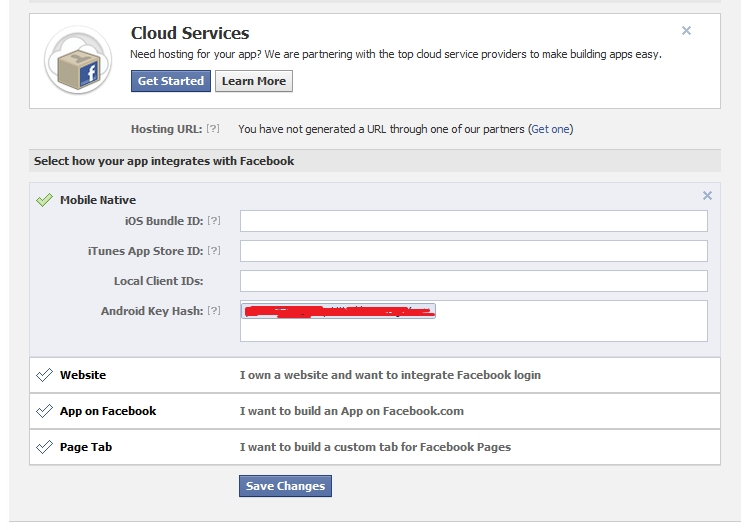
Update the HashKey in the Android Key Hash Textbox and click save changes. We are done, go ahead and run your app and it will work fine. No more Invalid key exception
Edit (Jun-24-2014): Nezzar Waleed notified me about one easy solution he found out in stackoverflow, please check it out as well.
Persist domain models in Android using ORMLite
Recent days I am spending my spare time writing a small app for Android. As usual I have to deal with persistence. I really don’t want to write a persistence mechanism for myself. I started searching for an ORM in Android world. After some evaluation I decided to use ORMLite. It did a pretty good job of mapping my models to db. ORMLite use annotation based configuration, I will go into details later in this post. ORMLite will support entity relationship, lazy loading, etc. Another big advantage is, it’s an open source. Downside is it’s file size, above 200kb (great powers comes with some file size). I felt very comfortable with ORMLite and decided to use it in my app.
I modified the ContactList test application to see how ORMLite works. Let’s go through in detail.
-
Download ormlite-android-4.24.jar and ormlite-core-4.24.jar from sourceforge.
-
Refer the jar files in ContactList project.
Note for non java devs. In Eclipse to refer a jar file, In navigator window right click on the project and select properties. Select Java Build Path from the list and click on Libraries tab. Click on ‘Add External JARs’ button and point to the required jar files.
Next we need to annotate the Contact entity to specify the mapping. Let’s see the Contact entity.
package com.contactlist;

import com.j256.ormlite.field.DatabaseField;
import com.j256.ormlite.table.DatabaseTable;
@DatabaseTable(tableName="contact")
public class Contact {
    Contact(){//used by ORMLite}
    public Contact(String id, String displayName)
    {
        _id=id;
        _displayName=displayName;
    }
    @DatabaseField(columnName="id")
    private String _id;
    @DatabaseField(columnName="display_name")
    private String _displayName;

    public String getId(){return _id;}
    public String getDisplayName(){return _displayName;}
}
As you can see the Contact class is annotated with DatabaseTable and specified the table to map. Also the private field is annotated with DatabaseField to map, columnName is optional. If not mentioned then ORMLite will use the variable name as the table column name. Another advantage is, ORMLite works on private variable, so we can make our class immutable.
You can see the basics of using ORMLite in Android here. As per the guideline we need to create a dbHelper extends from OrmLiteSqliteOpenHelper. Let’s see the db helper of ContactList app.
package com.contactlist.repository;

import android.content.Context;
import android.database.sqlite.SQLiteDatabase;
import android.util.Log;
import com.contactlist.*;
import com.j256.ormlite.android.apptools.OrmLiteSqliteOpenHelper;
import com.j256.ormlite.support.ConnectionSource;
import com.j256.ormlite.table.TableUtils;

public class DBHelper extends OrmLiteSqliteOpenHelper  {

    private static DBHelper _helperInstance;
    public static DBHelper getInstance(Context context)
    {
        if(_helperInstance==null)
            _helperInstance=new DBHelper(context);

        return _helperInstance;
    }

    public DBHelper(Context context)
    {
        super(context, AppConstants.DATABASE_NAME, null, AppConstants.DATABASE_VERSION);
    }
    @Override
    public void onCreate(SQLiteDatabase sqliteDatabase, ConnectionSource connectionSource)
    {
        try
        {
            TableUtils.createTable(connectionSource, Contact.class);
        }
        catch (Exception e) {
            Log.e(AppConstants.LOG_NAME, "could not create table Contact",e);
        }
    }

    @Override
    public void  onUpgrade(SQLiteDatabase database, ConnectionSource connectionSource, int oldVersion, int newVersion)
    {

    }

    @Override
    public void close()
    {
        super.close();
        _helperInstance=null;
    }
}
When we implement dbHelper we need to override onCreate and onUpgrade as shown below. onCreate will get called when the app is installed for the first time. onUpgrade will get called when and upgrade to the app, so that we can add scripts for creating new tables, etc. In the above code in onCreate I created the table called contact using one of the class provided by ORMLite.
I done with all the infrastructure stuff. It’s the time to create our repository class to persist our Contacts to a Sqlite db.
package com.contactlist.repository;

import java.io.InputStream;
import java.sql.SQLException;
import java.util.List;
import android.content.ContentResolver;
import android.content.ContentUris;
import android.content.Context;
import android.database.Cursor;
import android.graphics.Bitmap;
import android.graphics.BitmapFactory;
import android.net.Uri;
import android.provider.ContactsContract;
import com.contactlist.*;
import com.j256.ormlite.android.apptools.OrmLiteSqliteOpenHelper;
import com.j256.ormlite.dao.Dao;

/**
 * @author sony arouje
 *
 */
public class ContactRepository {
    private ContentResolver _contentResolver;

    private Context _context;
    public ContactRepository(ContentResolver contentResolver, Context context) {
        this._contentResolver = contentResolver;
        this._context=context;
    }

    public List<Contact> getContacts() {
        ContactList contactList = new ContactList();
        Uri uri = ContactsContract.Contacts.CONTENT_URI;
        String sortOrder = ContactsContract.Contacts.DISPLAY_NAME
                + " COLLATE LOCALIZED ASC";
        Cursor cur = _contentResolver.query(uri, null, null, null, sortOrder);
        if (cur.getCount() > 0) {
            String id;
            String name;
            while (cur.moveToNext()) {

                id = cur.getString(cur
                        .getColumnIndex(ContactsContract.Contacts._ID));
                name = cur
                        .getString(cur
                                .getColumnIndex(ContactsContract.Contacts.DISPLAY_NAME));
                Contact c = new Contact(id,name);
                contactList.addContact(c);
            }
        }
        cur.close();
        return contactList.getContacts();
    }

    public void saveContacts(List<Contact> contacts) throws SQLException
    {
        OrmLiteSqliteOpenHelper dbHelper= DBHelper.getInstance(_context);
        Dao<Contact, Integer> daoContact=dbHelper.getDao(Contact.class);
        for (Contact contact : contacts) {
            daoContact.create(contact);
        }
        dbHelper.close();
    }
}
In the above code I persist the Contacts using saveContacts(). I don’t think it really need any explanation, it’s a pretty simple function.
For testing I called the save function ContactListActivity as shown below
_contactRepo=new ContactRepository(getContentResolver(),getApplicationContext());
List<Contact> contactList=_contactRepo.getContacts();

try {
    _contactRepo.saveContacts(contactList);
} catch (SQLException e) {
    e.printStackTrace();
}
If you want to verify your db, you can do it very easily through eclipse. You can find a detailed step by step description here to view the db created in the emulator. I use SQLiteSpy to browse the SQlite db.
Download source here (ContactList_ORMLite.zip).
List Contacts–My first Android app
Last couple of days I am trying to get a hang on Android development. My first task is to setup the dev environment, I started with Intellij IDEA. Google considered Eclipse as their dev platform for Android. So I moved to Eclipse. Initially Android world is bit challenging as I am from .NET world. When I start working in Android, I feel comfortable. If you develop in Silverlight/WPF using MVVM then it’s not a big deal to create View and Activities in Android. I gone through one of the free ebook available for Android, now it’s time to practice what I learned.
Let’s go through my first app. Listing of contacts, obviously it’s a simple one. Below is my requirement.
-
List all the contact’s Display name
-
Click event on the list should also give ID of the contact not just name. So can able to load details of the contact by querying with ID.
-
Each contact should display with a graphics or an arrow or something. This will help me to learn binding view to ListView.
Output in emulator

Code walkthrough
I think it’s better start with the main activity and move forward. In this simple app I have only one activity called ContactListActivity.java. Oh forgot to tell you, activity is just like the viewmodels in MVVM (Silverlight/WPF). Activity handles all the UI related stuffs. Let’s see how the ContactListActivity looks
1: public class ContactListActivity extends ListActivity {
2: /** Called when the activity is first created. */
3: @Override
4: public void onCreate(Bundle savedInstanceState) {
5: super.onCreate(savedInstanceState);
6: ContactList contactList=this.getContacts();
7: ArrayAdapter<Contact> adapter=new ContactAdapter(this,contactList.getContacts());
8: setListAdapter(adapter);
9: }
10:
11: @Override
12: protected void onListItemClick(ListView l, View v, int position, long id)
13: {
14: super.onListItemClick(l, v, position, id);
15: Object o=this.getListAdapter().getItem(position);
16: Contact c=(Contact)o;
17: Toast.makeText(this, c.getDisplayName(), Toast.LENGTH_SHORT).show();
18: }
19:
20: private ContactList getContacts()
21: {
22: ContactList contactList=new ContactList();
23: Uri uri=ContactsContract.Contacts.CONTENT_URI;
24: ContentResolver cr=getContentResolver();
25: String sortOrder = ContactsContract.Contacts.DISPLAY_NAME + " COLLATE LOCALIZED ASC";
26: Cursor cur=cr.query(uri, null, null, null, sortOrder);
27: if(cur.getCount()>0)
28: {
29: String id;
30: String name;
31: while(cur.moveToNext())
32: {
33: Contact c =new Contact();
34: id = cur.getString(cur.getColumnIndex(ContactsContract.Contacts._ID));
35: name=cur.getString(cur.getColumnIndex(ContactsContract.Contacts.DISPLAY_NAME));
36: c.setId(id);
37: c.setDisplayName(name);
38: contactList.addContact(c);
39: }
40: }
41: cur.close();
42: return contactList;
43: }
44: }
I don’t have any complex View for this activity so no xml file to link here. Normally an activity will have view that has textbox, button etc. It’s a good practice to define the layout (view) in xml file and Link to Activity. I will explain that later.
The above activity just list down all the contacts, so I inherited from ListActivity. As you can see I override onCreate method. This method will execute when activity get created. First thing I did in onCreate is get a list of contacts. Ignore where I created getContacts(), anyway it’s a test project so leave it.
In getContacts() you can see ContactList and Contact those two are domain class. Rest of the things are easy to understand if you have some knowledge in Android. If you are new to Android world better go through the book I mentioned at the begning of this post. getContacts() return ContactList object contains list of Contacts.
Next step is to bind the Contacts to ListView. Android uses Adapters to bind any kind of list to items control. Here in this case I am not just binding a string array, I am going to bind a view. So I created new Adapter extends from ArrayAdapter called ContactAdapter.
ContactAdapter.java
1: public class ContactAdapter extends ArrayAdapter<Contact> {
2:
3: private final List<Contact> _contacts;
4: private final Activity _context;
5:
6: public ContactAdapter(Activity context, List<Contact> contacts)
7: {
8: super(context,R.layout.contactlistitem,contacts);
9: this._contacts=contacts;
10: this._context=context;
11: }
12: static class ViewHolder {
13: protected TextView text;
14: private Contact _contact;
15: protected void setContact(Contact contact)
16: {
17: text.setText(contact.getDisplayName());
18: _contact=contact;
19: }
20: protected Contact getContact() {return _contact;}
21: }
22: @Override
23: public Contact getItem(int position)
24: {
25: return _contacts.get(position);
26: }
27: @Override
28: public View getView(int position, View convertView, ViewGroup parent)
29: {
30: View view=null;
31: if(convertView==null)
32: {
33: LayoutInflater inflater=_context.getLayoutInflater();
34: view=inflater.inflate(R.layout.contactlistitem, null);
35: final ViewHolder viewHolder=new ViewHolder();
36: viewHolder.text=(TextView)view.findViewById(R.id.txtDisplayName);
37: viewHolder.setContact(_contacts.get(position));
38: view.setTag(viewHolder);
39: }
40:
41: return view;
42: }
43: }
As you can see in Line#8, I mentioned the View. So this adapter uses the specified view and bind it to ListView. You can find more about LayoutInflater here.
contactlistitem is an xml file and I defined in Layout folder.
<?xml version="1.0" encoding="utf-8"?>
<LinearLayout
  xmlns:android="http://schemas.android.com/apk/res/android"
  android:layout_width="match_parent"
  android:layout_height="match_parent" android:orientation="horizontal" android:weightSum="1">
    <TextView android:textAppearance="?android:attr/textAppearanceMedium"
    android:text="TextView"
    android:layout_height="wrap_content"
    android:id="@+id/txtDisplayName"
    android:layout_width="304dp"></TextView>

    <TextView android:textAppearance="?android:attr/textAppearanceLarge"
    android:id="@+id/textView1"
    android:text=">"
    android:layout_height="wrap_content"
    android:layout_width="wrap_content"></TextView>
</LinearLayout>
R.* is an auto generated file contains the index to different stuffs in the project like Layout, controld identifier, etc.
Note: To create contacts in emulator you need to specify Virtual SD Card size say 200 Mib while creating the AVD through Android SDK and AVD Manager.
Download Source Code (ContactList.zip).
Persist Domain Model using NHibernate
Last couple of days I was spending time with NHibernate. I went through several articles and books related to NHibernate. I learned bits and pieces about hibernate, next step for me is to implement what ever I learned so far. I choose a small Sales Tax problem for learning NH.
Object Relational Mappers are best suited in Object oriented development (OOD). In OOD process the designer first implement the domain model based on the business requirement. Then use any ORM to persist. In this approach we are giving importance to domain model then comes the db modelling. Domain model and NHibernate will go hand in hand. A designer can design the domain model without thinking much about persistence. Anyway I am not going much in detail of Domain models, you all can read more from Patterns of Enterprise Application Architecture and Domain-Driven Design: Tackling Complexity in the Heart of Software
Below is the rough diagram of domain model I created

Let’s go through Order Entity
namespace DDD.DomainModel
{
    public class Order
    {
        private IList<OrderLine> _lineItems;
        private Customer _customer;
        private ISalesTaxCalculator _salesCalculator;
        private int _orderId;

        private Order()
        {

        }
        public Order(Customer customer, ISalesTaxCalculator salesCalculator)
        {
            this._customer = customer;
            this._lineItems = new List<OrderLine>();
            this._salesCalculator = salesCalculator;
        }

        public int OrderId
        {
            get { return _orderId; }
        }
        public Order With(OrderLine orderLine)
        {
            Money tax = _salesCalculator.CalculateTax(orderLine);
            orderLine.SetTaxAmount(tax);
            orderLine.SetOrder(this);
            _lineItems.Add(orderLine);
            return this;
        }
        public Money GetTotalTax()
        {
            Money totalTax = Money.Empty();
            for (int i = 0; i < _lineItems.Count; i++)
                totalTax += _lineItems[i].GetTaxAmount();
            return totalTax;
        }
        public Money GetGrandTotal()
        {
            Money total = Money.Empty();
            for (int i = 0; i < _lineItems.Count; i++)
                total += _lineItems[i].GetSubTotal();
            return total;
        }

        public int GetNumberOfItems()
        {
            return this._lineItems.Count();
        }
        public virtual IList<OrderLine> LineItems
        {
            get { return _lineItems; }
        }
        public Customer Customer
        {
            get
            {
                return _customer;
            }
        }

    }
}
As you could see in the order class there is no Getter/Setter properties for setting the data from db. One of the good feature of NHibernate is, it can set or get data from private fields via reflection. It helps us to maintain Immutability in entities.
Mapping File
Hibernate uses xml configuration files to map Entities to database tables. Let’s see the configuration file for Order entity.
<?xml version="1.0" encoding="utf-8" ?>
<hibernate-mapping default-access="field"
    xmlns="urn:nhibernate-mapping-2.2"
    auto-import="true">
  <class name="DDD.DomainModel.Order,DDD.DomainModel"  lazy="false" table="[Order]">
    <id name="OrderId" column="order_id" access="nosetter.camelcase-underscore">
      <generator class="native"></generator>
    </id>
    <bag
      name="LineItems"
      cascade="all-delete-orphan" access="nosetter.camelcase-underscore" lazy="true">
      <key column ="order_id"/>
      <one-to-many class ="DDD.DomainModel.OrderLine,DDD.DomainModel"/>
    </bag>
    <many-to-one name="Customer" column="customer_id" not-null="false" cascade="none"
access="nosetter.camelcase-underscore" update="false"
       class="DDD.DomainModel.Customer,DDD.DomainModel"/>
  </class>
</hibernate-mapping>
Let’s go through the config file
In the class tag, I mapped the Order class with the database table Order. Inside the class tag provide the mappings for the fields to the table row.
id tag tells hibernate that the field is an Identity field, here I mapped _orderId to column order_id. So what is this access property. It will directs the hibernate from where to get/set the value. Here I set as nosetter.camelcase-underscore. I explain that part later.
Bag tag tells hibernate that LineItems is a collection. Inside bag we define the relationship with orderline.
Access Attribute
Hibernate can set value to private fields or to property. Hibernate uses ‘access’ attribute to determine this.
field: Set access to field (access=’field’) directs hibernate to read values from private field during persisting and while fetching it sets the private field with the value from database. I feel it’s a very important feature, this makes objects hides the data and exposed through predefined interfaces.
property: Set access to property (access=’property’) directs hibernate to get and set values to the properties.
nosetter.*: Set access to property (access=’nosetter’) directs hibernate to get values from property of the field mentioned but set value to private field. Let’s explain with an e.g.
private Customer _customer;
public Customer Customer { get { return _customer; } }
In xml we configure like
<many-to-one name="Customer" column="customer_id" not-null="false" cascade="none" access="nosetter.camelcase-underscore" …./>
This tells hibernate while persisting get the value from the Customer property but while setting the value from db uses the variable field (with same name as property) in camelcase-underscore format, here it will set the value to _customer.
You all can see the rest of the configuration in the source code.
Hibernate Repository
I created a generic repository for Hibernate just like the one I created for Entity Framework. Let’s go through the hibernate repository.
public class HibernateRepo:IRepository
{
    IList _itemsAdded = new System.Collections.ArrayList();
    ISession _session;

    private static ISessionFactory CreateSessionFactory()
    {
        Configuration cfg = new Configuration().Configure();
        return cfg.BuildSessionFactory();
    }

    private ISession Session
    {
        get
        {
            if (_session!=null && _session.Connection.State != System.Data.ConnectionState.Open)
            {
                _session.Connection.Close();
                _session.Connection.Open();
            }
            if (_session == null || _session.IsOpen == false)
                _session = CreateSessionFactory().OpenSession();

            return _session;
        }
    }

    ITransaction _currentTransaction = null;
    public void BeginTransaction()
    {
        _currentTransaction= this.Session.BeginTransaction();
    }
    public void CommitTransaction()
    {
        if (_currentTransaction != null)
            _currentTransaction.Commit();
    }
    public void Rollback()
    {
        if(_currentTransaction!=null)
            _currentTransaction.Rollback();
    }


    public IQueryable<TEntity> GetQuery<TEntity>() where TEntity : class
    {
        return this.Session.Query<TEntity>();
    }

    public IList<TEntity> GetAll<TEntity>() where TEntity : class
    {
        return this.GetQuery<TEntity>().AsEnumerable<TEntity>().ToList();
    }

    public IList<TEntity> Find<TEntity>(System.Linq.Expressions.Expression<Func<TEntity, bool>> criteria) where TEntity : class
    {
        IList<TEntity> entities= this.GetQuery<TEntity>().Where(criteria).ToList();
        NHibernateUtil.Initialize(entities);
        return entities;
    }

    public TEntity Single<TEntity>(System.Linq.Expressions.Expression<Func<TEntity, bool>> criteria) where TEntity : class
    {
        TEntity entity= this.GetQuery<TEntity>().SingleOrDefault<TEntity>(criteria);
        return entity;
    }

    public TEntity First<TEntity>(System.Linq.Expressions.Expression<Func<TEntity, bool>> criteria) where TEntity : class
    {
        TEntity entity = this.GetQuery<TEntity>().FirstOrDefault<TEntity>(criteria);
        return entity;
    }

    public void Add<TEntity>(TEntity entity) where TEntity : class
    {
        _itemsAdded.Add(entity);
    }

    public void Delete<TEntity>(TEntity entity) where TEntity : class
    {
        this.Session.Delete(entity);
    }

    public void Delete<TEntity>(IEnumerable<TEntity> entites) where TEntity : class
    {
        throw new NotImplementedException();
    }

    public void SaveChanges()
    {
        for (int i = 0; i < _itemsAdded.Count; i++)
        {
            this.Session.SaveOrUpdate(_itemsAdded[i]);
        }
    }

    public void Dispose()
    {
        if (this.Session != null)
        {
            _session.Close();
            _session.Dispose();
        }
        if (this._currentTransaction != null)
            _currentTransaction.Dispose();
    }
}
Most of the functions are same as the one I created for EF. Let’s go through some function I added for hibernate.
You might wonder why there is no connection string mentioned in this class, also there is no reference about the mapping xml files. How hibernate get all these information? Hibernate uses a configuration file called ‘hibernate.cfg.xml’. This file should exist in the bin folder. This file is not mandatory, you can directly give all the information to hibernation while creating session. Let’s see the configuration file
<?xml version="1.0" encoding="utf-8" ?>
<hibernate-configuration xmlns="urn:nhibernate-configuration-2.2">
  <session-factory>
    <property name="connection.provider">
      NHibernate.Connection.DriverConnectionProvider
    </property>

    <property name="connection.driver_class">
      NHibernate.Driver.SqlClientDriver
    </property>
    <property name="connection.connection_string">
      Data Source=PROLAPE00700\SQLSERVER;Initial Catalog=SASales;
      Persist Security Info=True;User ID=sony;pwd=sony
    </property>
    <property name="proxyfactory.factory_class">
NHibernate.ByteCode.Castle.ProxyFactoryFactory, NHibernate.ByteCode.Castle
    </property>
    <property name="dialect">
      NHibernate.Dialect.MsSql2008Dialect
    </property>
    <mapping assembly="DDD.Infrastructure.Persistance"/>
  </session-factory>
</hibernate-configuration>
I configured connection string and mapping assembly here. Hibernate uses mapping assembly tag to find out here the mapping files located and it fetches from the assembly using reflection. One thing to remember is the mapping files Build Action should be Embedded Resource.
How this configuration file get passed to hibernate? Have a look at the static function in the repository called CreateSesstionFactory().
private static ISessionFactory CreateSessionFactory()
{
    Configuration cfg = new Configuration().Configure();
    return cfg.BuildSessionFactory();
}
When we call Configuration().Configure() hibernate search for the above configuration file and uses the settings in the file to configure the session.
Once you go through the source you might understand how easy we can persist out domain models with less effort.
Download Source Code
Entity Framework Vs NHibernate
I worked on EF POCO model for some times and I come across with several stopovers. EF doesn’t have a very good error reporting, it will just throw some error and we need to run pillar to post to find out why on earth we are getting this error. Another issue is working in disconnected mode, I will explain in detail later in this post. For testing I used EF CTP5, hopefully things might have improved in the latest release.
After dating with EF for quiet some time, I realized that EF is not matured enough to hang around with, it’s still evolving and need time. I thought I need to look around and see any other beautiful and healthy ORM’s around. Yes I do aware of NHibernate a powerful ORM in the market for quiet a long period. So I decided to see in depth. I decided to write a small app to compare both ORM’s. For my comparison I used FluentNHibernate, I like to map my entities to table using code rather than an xml.
I haven’t completed the comparison yet. One of the important focus of my test is how CRUD operation works in disconnected model. In connected model the context can keep track of the changes and do the necessary Create/Update/Delete operation without much issue. So my test app have a WCF service to supply data to presentation layer.
First Test
The presentation layer issue a search request and get an author object from the WCF service, make some changes to author data and send it back to service for persisting it.
Entity Framework: Presentation layer get author object, did some changes to First Name. Sent the modified object to Service for persisting. In the persistence layer attached the author object to ObjectContext and called SaveChanges(). But nothing happened, EF couldn’t recognize the changes made to the object and didn’t persist the changes.
NHibernate: Presentation layer get author object, did some changes to First Name. Sent the modified object to Service for persisting. In the persistence layer make a call to SaveOrUpdate() of Session object with the modified entity. I could see that the changes get persisted to the db.
Test Summary
In my first test I could see that update operation in disconnected mode is pretty easy in NHibernate than EF. I am not sure whether am doing some thing wrong in EF thus it’s not persisting. But from a devs stand point we really don’t want to do much stuffs with an ORM to persist any changes. It’s ORM’s headache to figure out whether the entity state is dirty or not, if dirty then update it.
After this small test I feel like I need to embrace NHibernate as my ORM. Also one of the good feature of NHibernate is it’s error reporting. NH will report error with sql statement it issued to db, it will be helpful for a dev to analyze the error and take necessary actions.
EF might be strong in Autogenerated code, with EDMX, blah, blah. But not yet matured enough to support POCO model. In my point of view NHibernate is the right ORM to choose in comparison with Entity Framework, if you are serious in POCO model.
Note: NHibernate uses lazy loading extensively and you may have some trouble in WCF side while serializing it. It’s advisable to use DTO to transfer data between layers. Trent Foley have a nice post to explain how to perform eager loading with NHibernate.
This is just an initial test and I will move forward to test different scenarios. If I get time I will post the results in future posts.
Overview of Test Application
The test application consist of Presention layer (Winform), WCF service, Domain model and Persistence layer. The service layer and the persistence layer is loosely coupled. At any point of time Service layer doesn’t know to whom he is interacting, it can be EF repository instance or NH instance, I achieved it by Caste Windsor IOC. This loosely coupled approach help me to compare both ORM without any single code change rather with a xml configuration change.
For the test app I used Pubs database. One of domain entity is shown below.
namespace ORM.Domain
{
    [DataContract]
    public class Author
    {
        [DataMember]
        public virtual string Id { get; private set; }
        [DataMember]
        public virtual string LastName { get; set; }
        [DataMember]
        public virtual string FirstName { get; set; }
        [DataMember]
        public virtual string Phone { get; set; }
        [DataMember]
        public virtual string Address { get; set; }
        [DataMember]
        public virtual IList<Titles> TitlesAuthored { get; set; }
        public virtual bool Contract { get; set; }

        public Author()
        {
            this.TitlesAuthored = new List<Titles>();
        }
        public virtual void AddTitles(Titles titles)
        {
            this.TitlesAuthored.Add(titles);
            titles.Authors.Add(this);
        }
    }
It’s just a anemic entity without much responsibility. Anyway my focus is not in DDD, so just bare with my entity structure.
Now I need to map my entity to Author table. I used fluent API’s of the ORM to do the mapping.
Entity Framework Mapping
public class AuthorConfiguration:EntityTypeConfiguration<Author>
{
    public AuthorConfiguration()
    {
        HasKey(a => a.Id);
        HasMany(a => a.TitlesAuthored);
        Property(a => a.Id).HasColumnName("au_id");
        Property(a => a.Address).HasColumnName("address");
        Property(a => a.FirstName).HasColumnName("au_fname");
        Property(a => a.LastName).HasColumnName("au_lname");
        Property(a => a.Phone).HasColumnName("phone");
        Property(a => a.Contract).HasColumnName("contract");
        ToTable("dbo.authors");
    }
}
FluentHibernate Mapping
public class AuthorMap:ClassMap<Author>
{
    public AuthorMap()
    {
        Id(x => x.Id,"au_id");
        Map(x => x.LastName, "au_lname");
        Map(x => x.FirstName, "au_fname");
        Map(x => x.Address, "address");
        Map(x => x.Phone, "phone");
        Map(x => x.Contract, "contract");
        HasManyToMany(t => t.TitlesAuthored).Cascade.All().Table("titleauthor")
.ChildKeyColumn("title_id")
                           .ParentKeyColumn("au_id");Table("dbo.authors");
    }
}
What ever I posted here is just my findings. Don’t consider this as a benchmark. You better consider your scenarios and do a small tracer and find out which suites your requirement. Pay careful attention before deciding on any ORM else you will suffer later.
I think it’s better to stop here, you all can look into my source code for more details. I uploaded my test application to Sky drive, if interested pls have a look at it.
Chain of Responsibility pattern with Dependency Injection
Recently one of my friend asked me for a suggestion while preparing for an interview. The problem was, to find what kind of triangle by passing three values, whether it’s Equilateral or Isosceles, etc. He wanted to implement a scalable approach, that means adding a new type of triangle with minimal code change. First approach came to my mind is Iterator pattern, I ruled out that pattern immediately as it needs code change, if we want to add a new triangle. Next approach came to my mind is Chain of Responsibility, if we combine this pattern with Dependency Injection then will have room for scalability.
For demonstration I used Castle Windsor Inversion of Control container. I can add new triangles with minimal or no code change if we use IOC containers. We can add new triangles just by adding new component to the configuration file.
What is Chain of Responsibility? It’s like a quiz competition, if one team is not able to answer the question then pass it to another team. You can find more about Chain of Responsibility here . One main advantage of this approach is low coupling and orthogonal.
I used Chain of Responsibility to solve the Triangle problem. I have several type of Triangle class derived from ITriangle interface and stitched together using Castle Windsor. The values will passed to the first Triangle instance, if the first triangle instance can handle it, then return the result other wise pass the values to the next instance in the chain.
Let’s see the implementation.
public interface ITriangle
{
    string Execute(int x, int y, int z);
    void Add(ITriangle triangle);
}
Different Triangle Implementation
public class EquilateralTriangle:ITriangle
{
    private ITriangle _triangle=null;
    public EquilateralTriangle(ITriangle nextTriangle)
    {
        _triangle = nextTriangle;
    }
    public string Execute(int x, int y, int z)
    {
        int average = (x + y + z) / 3;
        if (average == x)
            return this.ToString();
        else
        {
            if(_triangle!=null)
                return _triangle.Execute(x, y, z);
        }

        return string.Empty;
    }

    public void Add(ITriangle triangle)
    {
        _triangle = triangle;
    }

    public override string ToString()
    {
        return "Equilateral Triangle";
    }
}
public class IsoscelesTriangle : ITriangle
{
    public IsoscelesTriangle (ITriangle nextTriangle)
    {
        _triangle = nextTriangle;
    }
    public IsoscelesTriangle() { }
    private ITriangle _triangle = null;
    public string Execute(int x, int y, int z)
    {
        int average1 = (x + y) / 2;
        int average2 = (y + z) / 2;
        int average3 = (x + z) / 2;
        if (average1 == x || average2 == y || average3 == z)
            return this.ToString();
        else
        {
            if (_triangle != null)
                return _triangle.Execute(x,y,z);
        }
        return string.Empty;
    }

    public void Add(ITriangle triangle)
    {
        _triangle = triangle;
    }
    public override string ToString()
    {
        return "Isosceles Triangle";
    }
}
So now I have two different type of Triangles. Both implementation check the values and if it satisfies then return the name other wise pass it to the chain.
Let’s see how can we call this
ITriangle isoscelesTriangle = new IsoscelesTriangle();
ITriangle head = new EquilateralTriangle(isoscelesTriangle);
Console.WriteLine(head.Execute(10,10,10));
Console.WriteLine(head.Execute(11,11,20));
The output will be
Equilateral Triangle
Isosceles Triangle
Here is one problem, if I want to add a new Triangle then I have to modify the code here. So how to make it scalable with no code change. Let’s see how we can scale it using an IOC Container. As I told earlier I am going to use Castle Windsor here.
We can use Fluent API or XML configuration to configure our components. Here I used XML for configuration. Let’s go through xml configuration file
<configuration>
  <components>
    <component id="IsoscelesTriangle"
      service="Triangles.IsoscelesTriangle, Triangles"
      type="Triangles.IsoscelesTriangle, Triangles">
    </component>
    <component id="Equilateral"
          service="Triangles.ITriangle, Triangles"
          type="Triangles.EquilateralTriangle, Triangles">
      <parameters>
        <nextTriangle>${IsoscelesTriangle}</nextTriangle>
      </parameters>
    </component>
  </components>
</configuration>
Have a look at the component with id Equilateral, I mentioned the interface and class that implements it. Also you can notice some thing called parameters, their I pass the constructor’s parameter. Here I directed castle to pass the instance of IsoscelesTriangle.
In Component IsoscelesTriangle we dont have any parameters, in this scenario it uses the default constructor.
Next step, we need to pass this configuration file to castle. Bellow code explains it.
public static class Ioc
{
    private static IWindsorContainer _container = null;
    public static T Resolve<T>() where T : class
    {
        InitializeWindsorContainer();
        return _container.Resolve<T>();
    }

    private static void InitializeWindsorContainer()
    {
        try
        {
            if (_container == null)
            {
                StringBuilder basePath = new StringBuilder(AppDomain.CurrentDomain.BaseDirectory);
                basePath.Append(@"IocConfiguration.xml");
                _container = new WindsorContainer(new XmlInterpreter(basePath.ToString()));
            }
        }
        catch (Exception ex)
        {
            throw;
        }
    }
}
Now we completed our IOC and configuration. Let’s see how I find the triangle now.
ITriangle head = Ioc.Resolve<ITriangle>();
Console.WriteLine(head.Execute(10,10,10));
Console.WriteLine(head.Execute(11,11,20));
Previously I created Isosceles Triangle instance then create Equilateral instance and pass Isosceles instance through constructor. In the above scenario, castle will create Equilateral instance by creating and passing Isosceles instance. So we are completely freed of creating the chains.
How can we add a new traingle? It’s very simple, first create a new triangle class derived from ITriangle as shown below.
public class XTriangle:ITriangle
{
    ITriangle _triangle;
    public XTriangle(){}

    public XTriangle(ITriangle nextTriangle)
    {
        _triangle = nextTriangle;
    }

    public string Execute(int x, int y, int z)
    {
        if (x > y)
        {
            return this.ToString();
        }
        else
        {
            if (this._triangle != null)
                return _triangle.Execute(x, y, z);
        }
        return null;
    }

    public void Add(ITriangle triangle)
    {
        throw new NotImplementedException();
    }
}
I need to plug this new Triangle to the chain, it’s as simple as modifying the configuration file as shown below.
Note: There is no triangle called XTriangle, just for demo I created a class.
<configuration>
  <components>
    <component id="XTriangle"
    service="Triangles.XTriangle, Triangles"
    type="Triangles.XTriangle, Triangles">
    </component>
    <component id="IsoscelesTriangle"
      service="Triangles.IsoscelesTriangle, Triangles"
      type="Triangles.IsoscelesTriangle, Triangles">
      <parameters>
        <nextTriangle>${XTriangle}</nextTriangle>
      </parameters>
    </component>
    <component id="Equilateral"
          service="Triangles.ITriangle, Triangles"
          type="Triangles.EquilateralTriangle, Triangles">
      <parameters>
        <nextTriangle>${IsoscelesTriangle}</nextTriangle>
      </parameters>
    </component>
  </components>
</configuration>
I made some changes and I marked those changes in Bold Italics. Let’s execute the project once again. As per the configuration the new XTriangle will get added to Isocles Triangle. Now the chain look like
Equilateral Triangle->Isosceles Triangle->XTriangle->[END OF CHAIN]
ITriangle head = Ioc.Resolve<ITriangle>();
Console.WriteLine(head.Execute(10,10,10));
Console.WriteLine(head.Execute(11,11,20));
Console.WriteLine(head.Execute(20, 3, 10));
The out put will be
Equilateral Triangle
Isosceles Triangle
Triangles.XTriangle
We added a new triangle to the chain with little code change.
Summary
With a mix of patterns we can build a scalable, low coupled system that can maintain very easily. Happy coding…
Download the Code
Hosting Pipe/TCP based WCF service in Windows Activation Service
In this post I will give a brief idea of how to host pipe/TCP based WCF service using WAS. Before WAS, we host TCP/pipe based service using custom hosting. That means we need to write an application ourself to host our services. Including me most of the deves wrote applications to host WCF services, so am not going in detail of custom hosting.
What’s WAS or Windows Process Activation services? WAS is part of IIS that enable us to host non http based services. I am not going much details of WAS. Here I am more concentrating on how to configure WAS and run a small test application.
Configure WAS in our System
By default WAS will be disabled. We need to enable it our self, let’s see how we can do that.
1. Goto control panels –> Programs and Features. Click on ‘Turn Windows Feature on or off’ link. It will open a window as shown below. From the list select Windows Process Activation Service and make sure all the child elements also selected.

2. Also scroll up and Select ‘Microsoft .NET Framework 3.xxx’ as shown below. Make sure all the child elements also selected, if not select it.

We enabled Windows Activation Service in our system. Let’s go ahead and create a WCF service.
For testing purpose I created a WCF service to add two numbers. Let’s see the service configuration
  <system.serviceModel>
    <behaviors>
      <serviceBehaviors>
        <behavior>
          <serviceMetadata httpGetEnabled="true"/>
          <serviceDebug includeExceptionDetailInFaults="false"/>
        </behavior>
        <behavior name="calcServiceBehaviour">
          <serviceMetadata httpGetEnabled="true" />
          <serviceDebug includeExceptionDetailInFaults="true" />
          <dataContractSerializer maxItemsInObjectGraph="2147483647"/>
        </behavior>
      </serviceBehaviors>
    </behaviors>
    <serviceHostingEnvironment multipleSiteBindingsEnabled="true" />
    <services>
      <service name="ServiceLayer.CalculatorService" behaviorConfiguration ="calcServiceBehaviour">
        <endpoint name="CalculatorService" address="" binding="netTcpBinding"
                  contract="ServiceLayer.ICalc" />
        <endpoint name="CalculatorService" address="" binding="basicHttpBinding"
          contract="ServiceLayer.ICalc" />
        <endpoint address="mex" binding="mexHttpBinding" contract="IMetadataExchange" />
      </service>
    </services>
  </system.serviceModel>
As you can see I have two endpoints HTTP and TCP. If we host this in IIS and try to browse it will throw error. Still some configuration is left behind. Let’s finish that config too.
Goto IIS configuration file. You can find that in C:\Windows\System32\inetsrv\config. Open applicationHost.config in notepad. You can see the screen shot below.

Search for bindings, and you can see the marked section as shown above. By default you could only see HTTP binding and rest of the binding you can add it. If other binding exist then we are good. If not copy paste the below bindings to the config file under Bindings section.
<binding protocol="net.tcp" bindingInformation="808:*" />
<binding protocol="net.pipe" bindingInformation="*" /><binding protocol="net.msmq" bindingInformation="localhost" />
<binding protocol="msmq.formatname" bindingInformation="localhost" />
Next step is create an application in IIS. I named the application as Calculator. Right click on the newly created Application and select Manage Application –> Advanced Settings…, you will get a popup as shown below

In the above popup you need to enable the protocol this application going to support. As you can see the marked section, I added http, pipe and tcp protocols for my Calculator service. We can enter the protocols like http,net.pipe,net.tcp (separated by comma).
Once again go back to applicationHost.config file and verify the Sites section. You can see the newly created site with protocols it supports. See the screen shot below

We are done with our configuration and the service is ready. Lets go ahead and browse our svc file. If it’s not throwing any error then we are good to go.
Note: If we install IIS after the installation of Visual studio then it will throw some an error like Error 500.21 Handler "svc-Integrated" has a bad module "ManagedPipelineHandler" in its module list". If you are getting this error then run aspnet_regiis.exe –i in VS command prompt.
Create an application to test our service, I created a winform app to test it. Also we need to create a proxy to access the service. We can create the proxy using svcutil. The util will create a config file as well as shown below.
  <system.serviceModel>
    <bindings>
      <basicHttpBinding>
        <binding name="CalculatorService1" closeTimeout="00:01:00" openTimeout="00:01:00"
            receiveTimeout="00:10:00" sendTimeout="00:01:00" allowCookies="false"
            bypassProxyOnLocal="false" hostNameComparisonMode="StrongWildcard"
            maxBufferSize="65536" maxBufferPoolSize="524288" maxReceivedMessageSize="65536"
            messageEncoding="Text" textEncoding="utf-8" transferMode="Buffered"
            useDefaultWebProxy="true">
          <readerQuotas maxDepth="32" maxStringContentLength="8192" maxArrayLength="16384"
              maxBytesPerRead="4096" maxNameTableCharCount="16384" />
          <security mode="None">
            <transport clientCredentialType="None" proxyCredentialType="None"
                realm="" />
            <message clientCredentialType="UserName" algorithmSuite="Default" />
          </security>
        </binding>
      </basicHttpBinding>
      <netTcpBinding>
        <binding name="CalculatorService" closeTimeout="00:01:00" openTimeout="00:01:00"
            receiveTimeout="00:10:00" sendTimeout="00:01:00" transactionFlow="false"
            transferMode="Buffered" transactionProtocol="OleTransactions"
            hostNameComparisonMode="StrongWildcard" listenBacklog="10"
            maxBufferPoolSize="524288" maxBufferSize="65536" maxConnections="10"
            maxReceivedMessageSize="65536">
          <readerQuotas maxDepth="32" maxStringContentLength="8192" maxArrayLength="16384"
              maxBytesPerRead="4096" maxNameTableCharCount="16384" />
          <reliableSession ordered="true" inactivityTimeout="00:10:00"
              enabled="false" />
          <security mode="Transport">
            <transport clientCredentialType="Windows" protectionLevel="EncryptAndSign" />
            <message clientCredentialType="Windows" />
          </security>
        </binding>
      </netTcpBinding>
    </bindings>
    <client>
      <endpoint address="net.tcp://sonyarouje/Calculator/CalculatorService.svc"
          binding="netTcpBinding" bindingConfiguration="CalculatorService"
          contract="ICalc" name="CalculatorService">
        <identity>
          <servicePrincipalName value="host/sonyarouje" />
        </identity>
      </endpoint>
      <endpoint address="http://localhost/Calculator/CalculatorService.svc"
          binding="basicHttpBinding" bindingConfiguration="CalculatorService1"
          contract="ICalc" name="CalculatorService1" />
    </client>
  </system.serviceModel>
Add an app.config to our test app and copy paste the config generated by svcutil. As you can see we have two endpoint http and tcp and we can use any of those. I called the service in button click and the code is as follows
CalcClient calc = new CalcClient("CalculatorService");
int x = Convert.ToInt32(txtX.Text);
int y = Convert.ToInt32(txtY.Text);
MessageBox.Show (string.Format("Sum is {0}", calc.Sum(x,y )));
calc.Close();
While creating the object of service proxy we can pass the endpoint name. Here I am passing CalculatorService and it is the name of tcp endpoint. So the communication will establish through TCP. If we pass CalculatorService1 it will use the http end point.
Hope my post will be helpful for some one. if any Comments or Suggestion, pls post it in the comment section.
Running Scala in IntelliJ IDEA 10
Last couple of days I was playing with Intellij to run Scala. As I am from .NET world Intellij IDEA was a new piece of tool for me. After installing Intellij, I was stumbled what to do next. I started googling and I came to know that Intellij, Netbeans, etc are using plugin models, that means to run Scala I should install plugin for Scala. Great, now how will I instruct Intellij to install Scala plugin for me. It’s very easy to find out, just open Intellij IDEA and you will see the screen as shown below.
Quick note: Intellij Community edition is free and you can download if from Jetbrains site.

Have a look at the right top portion of IDEA, you can see a Open Plugin Manager link button. Click the button and will open a window as shown below.

Go to the Available tab. The plugin manager will search and show all the available plugin for us. You can iterate through each plugin one by one or Type scala at the search box on the top. Once you find scala in the plugin list. Select it and right click and Say download and install it. That’s it, now we are ready to run scala.
Note: I assume you have already downloaded the Scala complier and new Java JDK and set environment variables properly. if not I will explain later in the post.
Creating our First Scala project
Let us start with famous HelloWorld project  . Click File –> New Project. Intellij will show below dialog box.

You can see the project name is HelloWorld, also I given the Project file location.
Click Next to continue. If you run for the first time, the IDEA will ask to point to the JAVA JDK installed folder. Just point the installed folder to him. In this scenario I already did that. So now I get a screen as follows
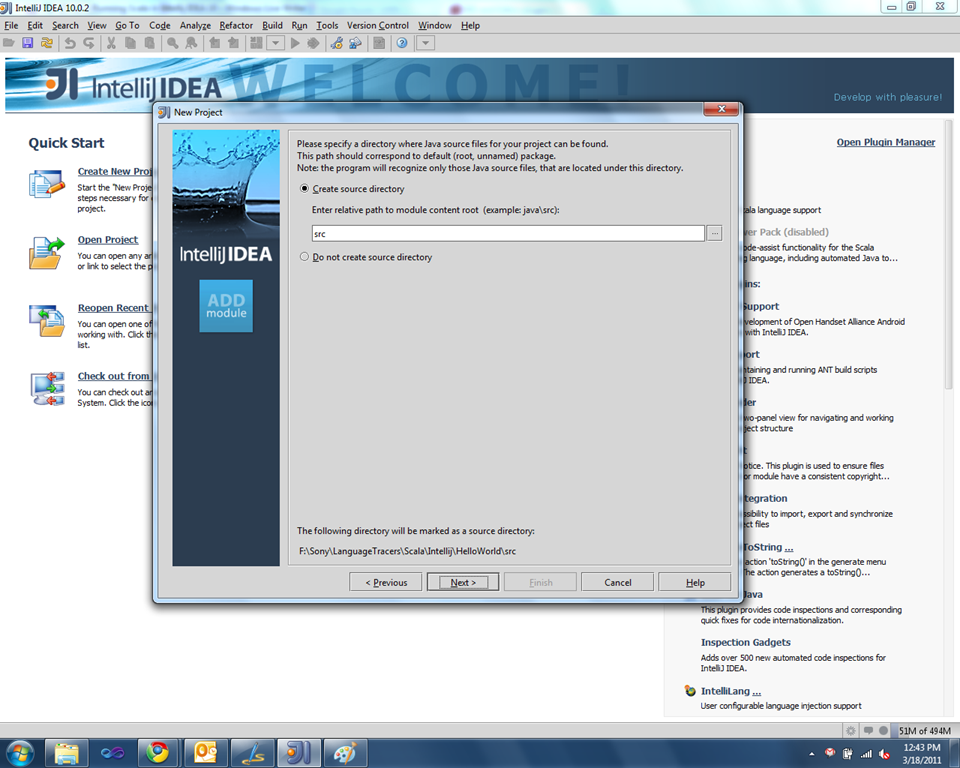
Just give the source folder name if you want it. Here I leave it to the default src. Click next button to select the desired technologies we are going to use. In our scenario its Scala.

I selected Scala from the list. We are done with creating the project. Just click Finish and complete our wizard.
Write Our First Scala Code
Right click the src folder and select New Package as shown below. I typed MyFirst here. Package is same as the namespace in our .Net world.

Now right click on the Package MyFirst and say New –> Scala File. I select object from Kind dropdown, I hope you all know what Object in scala means. It will show a dialog as shown below

I clicked Ok and IDEA shows the code editor, let’s type our first code as shown below
package MyFirst
object FirstApp{
def main (args:Array[String]){
println ("hello world")
}
}
So we done our first Hello World sample.
How to Run our Scala code
Every time I click the run button in IDEA, it will show up the Scala console. And I should run my scala code just like we run it from command prompt. What I wanted was, when I click run, the main function should execute without my intervention. Just like I do in Visual Studio. After some search and playing around in Intellij IDEA, I figured out the way to do it.
Click the small arrow next to the Run button as shown below and click on Edit Configuration.

Edit configuration will popup a dialog as shown below.

Click the + button in tool bar and select Application from the list. Enter the Fully qualified name in Main Class text box as shown below

We are done, now you can see the FirstApp in the dropdown just before the Run button in the Intellij tool bar. Click the Run button or Shift + F10 to execute the code. Below is the screen shot after running the code.

Configuring Scala Compiler and JDK
Download the latest Scala compiler from Scala Site. Also download the latest JDK.
I copied the Scala compiler in C drive. Next step is add the compiler folder to Path environment variable. Also add the JDK (till bin) to the Path variable. Install JDK if not exist in you machine.
I created a SCALA_HOME and JAVA_HOME environment variable
SCALA_HOME=C:\scala-2.8.1.final
JAVA_HOME=C:\Program Files\Java\jdk1.6.0_21
Append the Path variable with the newly created env variable as shown below.
PATH=$SCALA_HOME%\bin;%JAVA_HOME$\bin; + Path
Summary
You can also run Scala in NetBeans and Eclipse as well. You can see more details from Scala site. Initially I configured NetBeans for learning Scala.
Happy coding in Scalaaaaaaaaaaaaaaa.


 Sony Arouje